📝 Editor’s Note (2026 Update): The AI voice market is changing rapidly. If you are looking for the absolute best tools available right now, we have just wrapped up our extensive testing of the top platforms. Check out our definitive ranking: 7 Best AI Voice Generators in 2026 (Tested & Ranked).
Table of Contents
1. Introduction: “I’m Ready!” 🍍
“Bah-ha-ha-ha!”
If you can hear that laugh in your head, you are in the right place. SpongeBob SquarePants isn’t just a cartoon character; he is the undisputed king of internet culture. From “Mocking SpongeBob” memes to viral TikTok AI covers, everyone wants a piece of that high-pitched, energetic voice.
But if you have tried to generate this voice yourself, you have probably hit a wall of frustration.
The Problem: Google is Full of “Spam” Generators
You likely went to Google, searched for SpongeBob text to speech, and clicked on the first few results. What did you find?
Ad-infested websites that try to install pop-ups.
“Robotic” voices that sound like a broken GPS, not a sponge.
Paywalls asking for money just to download a 3-second clip.
Most of these tools use outdated technology from 2010. They don’t capture the laugh, the pitch, or the chaos of the character.
Don’t settle for robotic voices. The real AI technology sounds exactly like the show.
FakeYou is a community-driven, open-source project where fans train AI models of their favorite characters. Because it is built by fans, for fans, the SpongeBob models here are shockingly accurate.
In this guide, we won’t waste your time with paid scams. We will show you:
How to use FakeYou to generate the perfect SpongeBob voice for free.
Which specific model to choose (there are dozens, but only one is good).
How to skip the queues and download your audio for TikTok or Discord.
Ready to drop on the deck and flop like a fish? Let’s get started.
2. Why FakeYou is the King of Memes 👑
When you search for SpongeBob text to speech, you usually find two things: expensive professional tools that can’t do character voices, or sketchy apps that sound like generic robots.
FakeYou stands out because it is fundamentally different. It is not a corporate product; it is a community-driven Deepfake audio project.
Powered by Fans, Not Corporations 🤝
The reason the SpongeBob voices on FakeYou sound so frighteningly accurate is that they are trained by obsessive fans, not underpaid interns.
How it works: Contributors upload hours of clean audio from the TV show into deep learning models. They tweet the settings until the AI captures the specific “cracks” and pitch shifts in SpongeBob’s laugh.
The Result: You get the raw, chaotic energy of the character, which is exactly what you need for a viral meme or a funny TikTok.
The Whole Bikini Bottom Cast 🦀
A meme isn’t funny if SpongeBob is talking to a robot. You need the whole crew. FakeYou doesn’t just offer the yellow sponge. The library contains thousands of user-submitted models, allowing you to create full skits.
You can find high-quality models for:
Patrick Star: Perfect for slow, confused responses.
Squidward Tentacles: Ideal for sarcastic, nasal complaints.
Plankton: Great for “evil plan” monologues.
Mr. Krabs: For when you need to talk about money.
The Price Tag: 100% Free (But There’s a Catch) 💸
Here is the best part: FakeYou is free to use. You don’t need to enter a credit card. You don’t need to sign up for a trial that automatically charges you later.
However, “Free” comes with a cost in time. Because the site is so popular and runs on community donations, the servers are often overloaded. This leads to the infamous “Waiting Queue.” We will explain how to deal with this in the troubleshooting section, but just know: you might have to wait a few minutes for your audio to render.
3. Step-by-Step: How to Generate SpongeBob Voice on FakeYou
Ready to make your first meme? Follow this exact workflow to get the best results.
Since FakeYou has hundreds of user-uploaded models, choosing the wrong one can make SpongeBob sound like a demon. Here is how to navigate the chaos.
Step 1: Find the Right Model 🔍
Go to FakeYou.com.
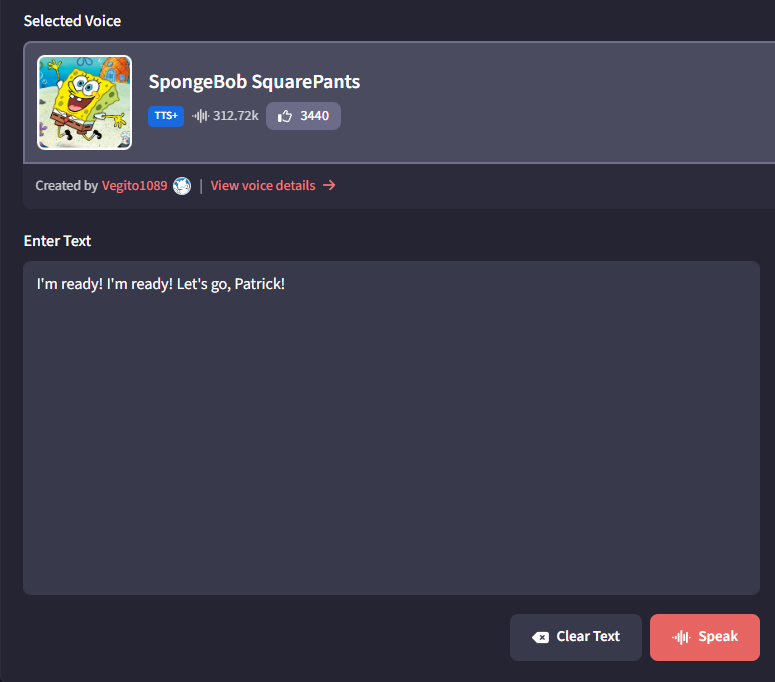
In the “Voice” search bar, type SpongeBob.
Crucial Tip: Don’t just click the first one. Look for models with the highest ratings or specific tags like “SpongeBob SquarePants (High Quality)”.
Step 2: Input Your Script 📝
Type your text into the box.
Pro Tip for Emotion: SpongeBob is energetic. Use exclamation marks (!), and lengthen words for effect (e.g., instead of “I am ready”, type “I’m reaaaady!!!”). The AI tries to interpret punctuation.
Step 3: Generate & Wait ⏳
Click the “Speak” button.
Watch the queue position. It might start at #150. Be patient.
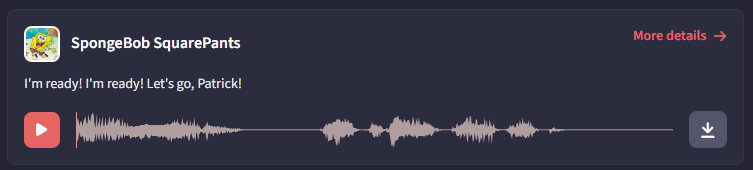
Once it finishes, a player will appear. Click play to preview.
Step 4: Download & Stitch (How to make conversations) ✂️
Important: FakeYou can only generate one voice at a time. You cannot script a whole conversation in one go.
If you want SpongeBob to talk to Patrick:
Generate SpongeBob’s line ➡️ Click “Permalink & Download” ➡️ Save as .wav.
Change the voice model to “Patrick Star”.
Generate Patrick’s response ➡️ Download.
Open a video editor (like CapCut or Premiere) or an audio editor (Audacity) and drag both files in to create the dialogue.
4. Troubleshooting: Dealing with the “Queue” Nightmare ⏳
If FakeYou is the best free SpongeBob text to speech generator, why doesn’t everyone use it?
Because of the Queue.
Since FakeYou relies on donated computing power (GPUs) to run these complex AI models, and thousands of people are trying to generate SpongeBob memes at the same time, a bottleneck is inevitable.
Here is the reality of using a free tool in 2025 and how to handle it.
The Reality Check
When you click “Speak,” you will likely see a message saying: “Pending.”
Best Case: You wait 30 seconds.
Worst Case: You wait 20 minutes (or hours) during peak US daytime hours.
Solution: FakeYou Premium
If you love the platform and want to support the community developers, you can buy a subscription (usually starts around $12/month).
The Benefit: This gives you “Priority Processing,” allowing you to skip the line of free users.
5. Pro Tip: How to Make SpongeBob Sound Crystal Clear (Audacity Guide) 🎛️
Because FakeYou generates audio using community-contributed models, the result can sometimes sound “grainy” or have static background noise.
Don’t worry—you don’t need expensive software to fix this. You can make it sound studio-quality using Audacity (which is 100% free).
Step 1: Download Audacity
If you don’t have it yet, download Audacityfrom the official site. It is the industry standard for free audio editing.
Step 2: Remove the “Static” Noise 🔇
The most common issue with AI-generated voices is a low buzzing sound in the background.
Open your SpongeBob voice file in Audacity.
Select a tiny part of the timeline where nobody is speaking (just the silence/noise at the very beginning or end).
Go to Effect ➡️ Noise Removal and Repair ➡️ Noise Reduction.
Click “Get Noise Profile”.
Now, select the entire track (Ctrl + A).
Go back to Effect ➡️ Noise Reduction and click OK.
The Result: The buzzing sound disappears, and SpongeBob’s voice pops out much clearer.
Step 3: Pitch Correction (Optional) 🎚️
If the AI model generated a voice that sounds slightly too deep (like a slowed-down SpongeBob):
Select the track.
Go to Effect ➡️ Pitch and Tempo ➡️ Change Pitch.
Move the slider slightly to the right (increase pitch by about +5% to +10%). This brings back that manic, high-energy squeak that defines the character.
Using the Noise Reduction tool takes 10 seconds but drastically improves AI audio.
6. Creative Ideas: How to Use Your SpongeBob Text to Speech Audio 💡
Now that you have a high-quality, noise-reduced SpongeBob text to speech file, what should you do with it?
The possibilities are endless, but here are the three most popular ways creators and gamers are using these AI voices in 2025.
1. The Ultimate Birthday Surprise 🎂
Forget boring greeting cards. Sending a personalized video message where SpongeBob explicitly says your friend’s name is a guaranteed way to make them laugh.
The Idea: Write a script that references an inside joke between you and your friend.
Example Script:“Happy Birthday, Mike! Patrick told me you turned 25 today! Are you ready to party? I’m ready!”
How to deliver: Send the raw audio file on WhatsApp, or edit it over a picture of a Krabby Patty in CapCut.
2. The Discord Soundboard Prank 🎮
If you are a gamer, you know that timing is everything. Dropping a SpongeBob quote right after your teammate misses an easy shot in Valorant or League of Legends is comedy gold.
Streamers also love using these character voices for donation alerts. If you stream, check out our dedicated guide onText to Speech for Twitch to see how to set that up.
How to do it:
Generate short, punchy phrases in FakeYou (e.g., “Barnacles!”, “Technique! Technique!”, or “I neeeed it!”).
Download the WAV files.
Upload them to your Discord Soundboard (Server Settings -> Soundboard) or use a third-party tool like Voicemod or Soundpad.
Assign a hotkey and spam it (responsibly) during your next gaming session.
3. TikTok & Reels Trends (The “Contrast” Method) 📱
The biggest trend on TikTok right now is Juxtaposition—taking a cute, innocent voice like SpongeBob’s and making it read something completely unexpected.
Trend A: “Creepy Pasta” / Horror Stories: Having SpongeBob read a terrifying ghost story or an SCP file creates an unsettling, surreal vibe that keeps viewers watching.
Trend B: Serious Life Advice: Use the voice to read stoic philosophy quotes or complex financial advice. The contrast between the high-pitched voice and the serious topic drives engagement.
Trend C: POV Cooking: Narrate your cooking video as if SpongeBob is teaching you how to make a Krabby Patty (even if you are just making instant noodles).
“Scary Story, Cute Voice” trend is a viral hack on TikTok
Imagine SpongeBob narrating your history slides. It’s a guaranteed way to wake up the class. Learn the workflow in our guide on Voice Over with PowerPoint.
7. Important Legal Disclaimer: Fair Use vs. Copyright ⚖️
Before you start generating hours of audio for your YouTube channel, we need to have a serious conversation about copyright.
While SpongeBob text to speech technology is fun, the character of SpongeBob SquarePants is the intellectual property of Nickelodeon and Paramount Global (Viacom). They are very protective of their brand.
Here is what you need to know to stay out of trouble.
Understanding the Platform (User Generated Content)
It is important to understand that FakeYou operates on a “User Generated Content” (UGC) basis.
What this means: The SpongeBob voice model was not uploaded by Nickelodeon. It was trained and uploaded by a fan (a user).
The Implication: FakeYou hosts the technology, but you are responsible for how you use the audio.
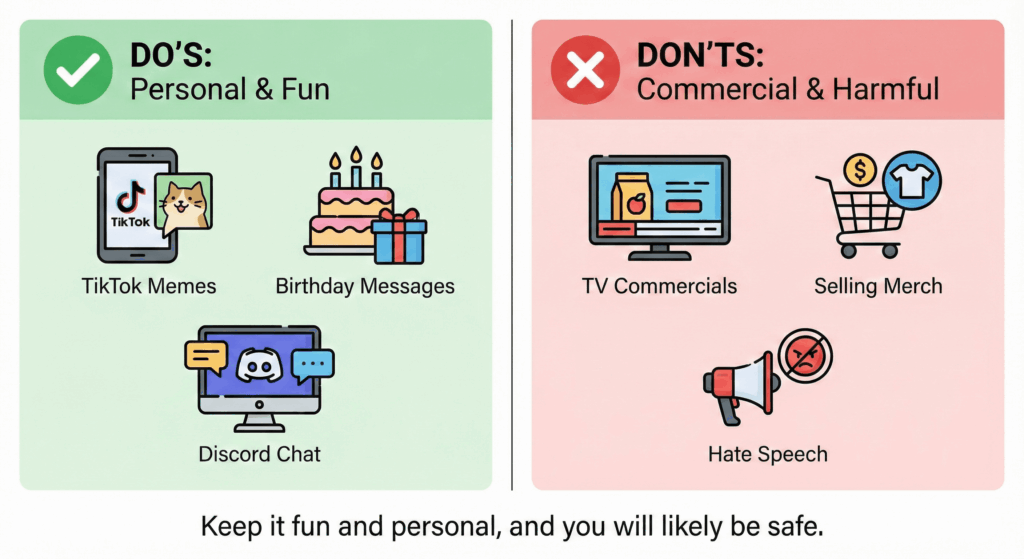
✅ The Safe Zone: Personal Use & Parody
Generally speaking, using AI voices falls under a legal “grey area,” but usually is tolerated under the doctrine of Fair Use if it fits these categories:
Memes & Parody: You are making a joke, a skit, or a commentary that clearly pokes fun at the character or puts them in absurd situations.
Personal Use: Sending a birthday message to a friend, using it on a private Discord server, or making a voicemail greeting.
Non-Commercial Education: Using the voice for a school project.
❌ The Danger Zone: Commercial Use
Do not use the SpongeBob AI voice for anything that generates direct revenue or sells a product. This is where companies like Viacom draw the line.
Bad Example: Creating a radio ad for your local pizza shop using SpongeBob’s voice. Result: You will likely get a Cease & Desist letter or be sued.
Bad Example: Selling personalized “SpongeBob Greetings” on Fiverr for $5. Result: Your gig will be banned.
Bad Example: Using the voice to say hate speech, racist remarks, or illegal content. Result: You will be banned from the platform immediately.
The Bottom Line
Treat the voice with respect. If you use it for harmless fun and memes, you are part of the internet culture. If you try to profit from Nickelodeon’s IP without their permission, you are asking for trouble.
Disclaimer: We are tech enthusiasts, not lawyers. This information is for educational purposes only.
8. FAQ: Common Questions About SpongeBob Text to Speech
Here are the answers to the most frequent questions users have when generating character voices.
Is FakeYou safe to use?
Yes, FakeYou is safe. Unlike many “free generator” sites that require you to download sketchy .exe files or install browser extensions, FakeYou runs entirely in your web browser. You do not need to install anything on your computer.
Privacy Note: As with any public website, be mindful of the text you input. Do not type sensitive personal information (like passwords or credit card numbers) into the text box, as the data might be stored on their server logs for processing.
Can I download the audio files?
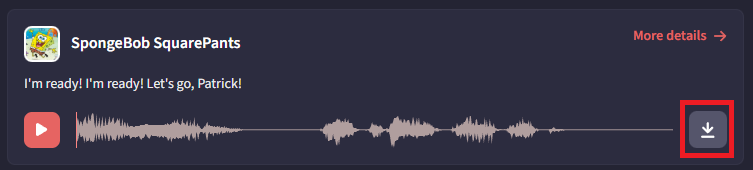
Absolutely. FakeYou allows you to download your generated clips for free, which is essential for video editing. How to do it:
Once the audio finishes generating, click the button labeled “Permalink & Download”.
You will be taken to a new page. Click the “Download” button.
The file will save to your device as a .wav file, compatible with all major video editors like CapCut, Premiere Pro, and DaVinci Resolve.
Why does the voice sometimes sound “glitchy” or robotic?
If your SpongeBob voice sounds a bit metallic or stutters, it is not your fault. The Reason: These AI models are community-trained, meaning they were built by fans using home computers, not by professional audio engineers in a multi-million dollar studio.
Data Quality: Sometimes the AI was trained on clips that had background music or noise, which confuses the generator.
The Fix: Refer back to Section 5 of this guide to learn how to clean up these glitches using Audacity in just a few clicks.
9. Conclusion: Start Your Bikini Bottom Adventure
You are now equipped with everything you need. You have dodged the spammy websites, avoided the “robotic” voice generators, and discovered the power of community-driven AI.
To summarize: If you want to generate a SpongeBob text to speech voice for a quick meme, a funny discord prank, or a birthday greeting, FakeYou is the undisputed champion of 2025. It captures the chaotic energy of the character better than any other free tool on the market.
However, remember the trade-off: Free access means waiting in queues and dealing with occasional audio glitches.