📝 Editor’s Note: Murf is fantastic for corporate slides, but if you need more creative freedom, you might want to explore alternatives. Check out our list of Best AI Voice Generators for 2026.
Table of Contents
If you are looking for an honest Murf AI review, you probably already know about ElevenLabs.
ElevenLabs sounds amazing—it is the undisputed king of realism. But let’s be honest about the workflow for business users.
While ElevenLabs focuses on storytelling, it often operates as a “standalone” tool. For corporate creators and L&D (Learning & Development) professionals who live inside Canva or Google Slides, switching tabs to generate audio and manually syncing it feels inefficient.
I previously compared Murf against other giants in my Best Text to Speech for Video Editing battle. Today, I want to dive deep specifically into Murf’s features for business.
I tested Murf AI extensively to see if its integrations and “Block-Based” studio solve this workflow bottleneck.
My verdict?
If you are a YouTuber looking for viral fame and emotional storytelling, stick with ElevenLabs Adam Voice.
But if you create presentations, ads, or corporate training—Murf AI is likely the tool you actually need.
Here is why.
What Makes Murf AI Different? (The Studio Approach)
Most AI tools on the market are just simple “generators.” You type text into a box, click a button, and get an MP3 file. That’s it.
Murf AI takes a completely different approach. It positions itself as a complete “Voiceover Studio.”
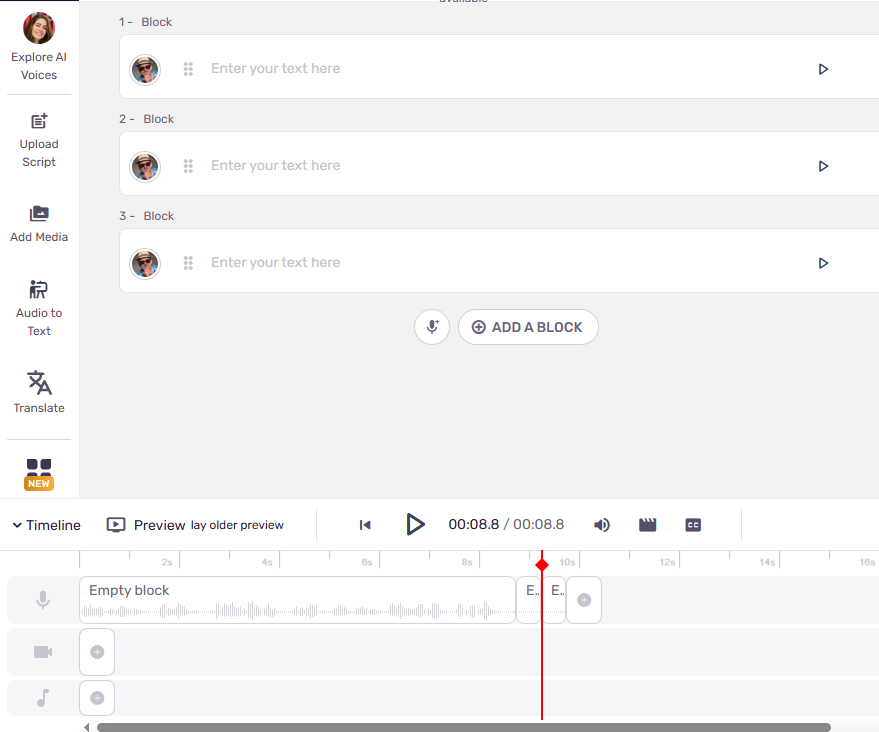
When you log in, it doesn’t look like a simple text converter. It looks like a professional workspace—a mix between Google Slides and a video editor like CapCut.
Instead of just generating audio, Murf allows you to build an entire project. You can upload your script, import your video footage, add background music, and insert images all in one timeline.
The Real Difference: Integrations (Canva & Google Slides)
Let’s be honest. ElevenLabs has caught up with almost every editing feature Murf used to brag about. So why would you still choose Murf in 2025?
The answer is Workflow Integrations.
While ElevenLabs forces you to work on their website, Murf AI comes to where you work.
- Canva Integration: Murf has a dedicated app inside Canva. You can generate voiceovers for your designs without ever leaving the Canva tab.
- Google Slides Add-on: If you are building a corporate presentation, you can use the Murf add-on to generate narration for each slide directly inside Google Slides.
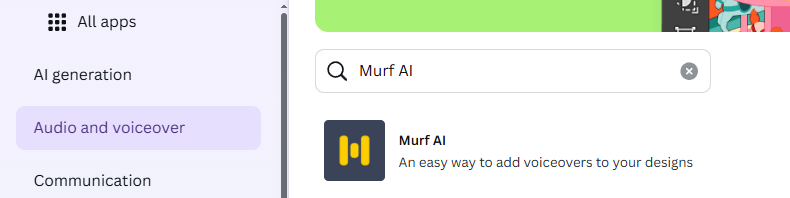
The Benefit: If your daily workflow revolves around Canva or Google Slides, Murf removes the friction of “Export -> Upload -> Download.” It is simply more convenient for heavy users of these tools.
Audio Quality Test: Does It Sound Robotic?
A critical part of any Murf AI review is audio quality. Let’s address the elephant in the room. Does Murf sound as human as ElevenLabs?
Honest Answer: Not exactly. And that is by design.
Murf does not have the viral “Adam” voice. Its AI models are trained differently. While ElevenLabs focuses on “hyper-realism” (breaths, stutters, raw emotion), Murf focuses on “Professional Clarity.”
Murf voices sound like professional newscasters or corporate trainers. They are clean, crisp, and articulate. They don’t have the “grit” of a movie trailer, but they are perfect for a Fortune 500 boardroom where clarity is more important than drama.
Listen to my test sample (Voice: Ken – US English):
My Analysis: As you can hear, the diction is flawless. It doesn’t “breathe” as heavily as ElevenLabs, which makes it sound slightly less organic, but much more stable. It is the safe, polished choice for education and business presentations.
Murf voices are professional but lack that viral grit. If you are looking for the famous TikTok narrator, check out my guide on how to get the ElevenLabs Adam Voice.
Murf AI vs ElevenLabs (The Showdown)
Which one should you choose? Here is a quick breakdown for 2025.
| Feature | Murf AI | ElevenLabs |
| Best For | Business, E-Learning, Ads | Storytelling, YouTube, Viral |
| Workflow | All-in-One (Video Sync) | Generate & Download |
| Voice Style | Professional, Clean | Emotional, Deep |
| Voice Cloning | Good | Industry Leading |
| Price | Starts ~$19/mo | Starts ~$5/mo |
The Verdict
The choice depends entirely on your goal:
- ElevenLabs wins on Price and Emotion. If you need the highest quality voice that captures the listener’s attention (and you are on a budget), this is the clear winner.
- Murf AI wins on Business Tools. If you need a consistent workflow, integrations with Canva/Google Slides, and a “safe” corporate voice, Murf is worth the extra cost.
Murf AI Review: Is It Worth the Cost?
Before you sign up, you need to understand one critical limitation of the Free Plan.
Warning: The free version of Murf is strictly a “Demo”. You can generate audio and listen to it inside the app, but you cannot download the files. If you want to use the voiceover in a real project, you must pay.
The Plans
- Creator / Basic (~$19/mo): Gives you access to basic voices and downloads. Good for individuals.
- Business / Pro (~$39/mo): Gives you the best AI voices, more generation hours, and commercial usage rights.
My Verdict
Is it worth it? It depends on who you are.
- For a Hobbyist: $19/month might feel steep (especially compared to ElevenLabs’ $5 starter).
- For a Business: It is a steal. If your company used to pay a professional voice actor $500 for a single training module, getting unlimited edits for $19/month is virtually free.
Murf AI Review: Pros and Cons
To be completely objective, here is a summary of what I loved and what I found frustrating during my testing.
✅ The Pros
- Video Sync Editor: This is the standout feature. Being able to visualize your video timeline while generating the voiceover changes your entire workflow.
- Granular Control: You can adjust the pitch, speed, or emphasis of specific text blocks without having to re-generate the entire project. This saves credit and time.
- Included Music Library: The subscription comes with a library of royalty-free background music, so you don’t need a separate subscription to Epidemic Sound or Artlist.
❌ The Cons
- No Free Downloads: This is the biggest annoyance. The free plan allows you to create audio, but you cannot export the file. It is strictly for testing the interface.
- Less Emotional Range: While professional, the voices lack the deep, cinematic emotional range found in ElevenLabs. They are better suited for instruction than storytelling.
- Higher Starting Price: The entry barrier is ~$19/month, which is significantly higher than competitors offering $5 starter plans.
Final Verdict: Who Should Buy Murf?
To conclude this Murf AI review, here is my final recommendation based on testing.
Buy Murf AI If…
You create corporate training, presentations, or explainer videos. You want “peace of mind” with your editing workflow. Murf is a professional studio in your browser that saves you from juggling three different apps. If you value consistency and tools over raw emotion, this is for you.
Stick to ElevenLabs If…
You run a “Cash Cow” YouTube channel, create horror stories, or need viral content. If your #1 priority is maximum realism and emotional depth for the lowest price ($5), ElevenLabs is still the king of storytelling. If you are building a Faceless YouTube Channel for entertainment, stick with ElevenLabs for better viewer retention.
FAQ about Murf AI
Q: Is Murf AI safe to use? A: Yes. Unlike some fly-by-night AI tools, Murf is built for Enterprise use. They adhere to strict data privacy and security standards, making it safe for creating internal corporate training and handling sensitive scripts.
Q: Can I use Murf for YouTube monetization? A: Yes. If you are on a paid plan (Basic, Pro, or Enterprise), you get full Commercial Rights to the audio you generate. You can monetize your videos on YouTube, run ads, or use the audio in podcasts without copyright issues.
Q: Does Murf have a free trial? A: Yes, but it comes with a major limitation. You can access the Studio, write scripts, and listen to all 120+ voices to test the quality. However, you cannot download the final audio file on the free plan. It is strictly for testing the workflow.
Murf is particularly strong when it comes to e-learning and corporate decks. If you want to see a practical example, check out my tutorial on how to add Voice Over with PowerPoint using this tool.
Transparency Note: This post contains affiliate links. If you use these links to buy something, I may earn a commission at no extra cost to you. Thanks for your support!