📝 Editor’s Note (2026 Update): The AI voice market is changing rapidly. If you are looking for the absolute best tools available right now, we have just wrapped up our extensive testing of the top platforms. Check out our definitive ranking: 7 Best AI Voice Generators in 2026 (Tested & Ranked).
Table of Contents
If you are a content creator in 2025, you are likely familiar with the “Workflow Chaos.”
It usually looks something like this: You write a script in ChatGPT. You switch tabs to generate a voiceover in ElevenLabs. You scour Storyblocks or Pexels for stock footage. Finally, you drag everything into Premiere Pro or CapCut to stitch it all together.
It is a slow, expensive, and disjointed process.
Lovo AI (and its flagship platform, “Genny“) promises to fix this. It claims to be the missing link—an All-in-One AI video creation platform that combines hyper-realistic text-to-speech with a full video editor, AI scriptwriting, and asset generation.
The big question is: Is Lovo AI truly the “Canva for Video Production,” or is it a “Jack of all trades, master of none”?
To answer this, I didn’t just read the marketing brochures. I subscribed to the Pro plan, generated over 60 minutes of audio, and produced several full videos from scratch. I tested the voice cloning, the emotional range, and the video timeline to see if it can actually replace a professional editor.
Here is my honest, hands-on review.
⚡ The Quick Verdict (For Busy Creators)
If you are looking for the absolute highest audio fidelity on the market, standalone tools like ElevenLabs still have a slight edge in pure realism.
However, if you are running a Faceless YouTube channel, creating marketing explainers, or producing e-learning modules at scale, Lovo AI is currently unrivaled.
Why? Because it cuts production time by 70%. It removes the friction of moving files between apps. For mass content production, Genny is a powerhouse.
2. What is Lovo AI (and Who is “Genny”)? 🤖
Before we dive into the features, we need to clear up a common confusion. You will often hear people use the terms “Lovo” and “Genny” interchangeably, but there is a distinction.
- Lovo AI: This is the company and the underlying technology.
- Genny: This is the name of their flagship product/platform that you actually use.
Most users sign up expecting a standard text-to-speech tool (like Murf AI or ElevenLabs), where you type text and download an MP3. Lovo is different.
Genny is not just a voice generator; it is a full-featured AI Video Editor with text-to-speech built into the core.
The Key Difference: The Timeline 🎞️
This is the single biggest reason to choose Lovo over its competitors.
In standard tools (like ElevenLabs), you are working in a “Text Box.” You generate audio, download it, and then open a separate video editor to sync it with visuals.
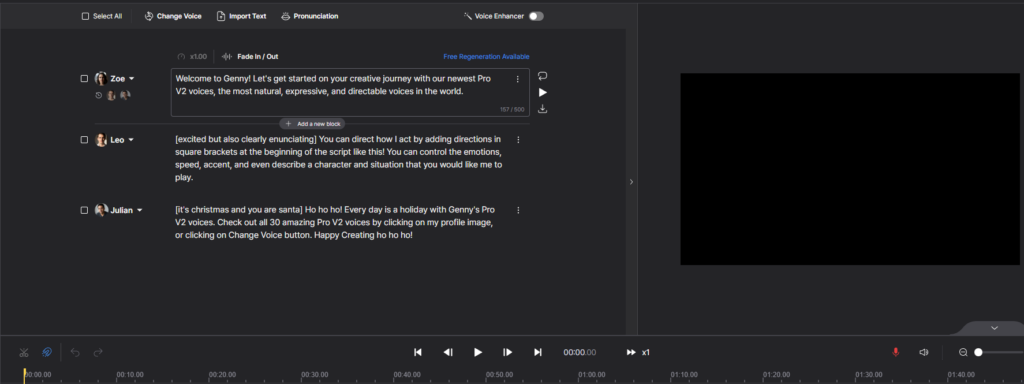
In Lovo (Genny), you work on a Video Timeline. You have separate tracks for:
- Voiceover (Generated from text).
- Video/Images (Stock footage or uploads).
- Sound Effects (SFX).
- Background Music.
This means you can generate a sentence, drag a stock video clip over it, and sync them perfectly—all within the same browser tab.
Who is Lovo AI Actually For?
Because it is a hybrid tool, it fits specific creators better than others.
1. Faceless YouTube Channels (The Automation Pros) If you run “Cash Cow” channels or are figuring out how to start a faceless youtube channel, Lovo is a dream. You don’t need to hire a voice actor or a video editor. You can script, voice, and edit the entire video in one place.
2. Marketers & Ad Creators For creating 30-second Instagram Reels or Explainer Videos, speed is key. Lovo allows you to visualize how the audio fits with the video instantly, saving hours of rendering and re-uploading.
3. L&D and Corporate Training Lovo is heavily optimized for e-learning. If you need to turn a PDF policy document into an engaging training video (or just need a simple pdf to sound converter for accessibility), the integrated workflow makes it incredibly fast to produce consistent content.
3. Key Features Deep Dive (Test & Analysis) 🔬
Marketing claims are one thing; actual performance is another. I spent a week using Genny as my primary content creation tool to test every major feature. Here is the deep dive into what works, what is “just okay,” and what will save you the most time.
Dzięki za tę kluczową uwagę! To diametralnie zmienia sposób pracy z narzędziem i pozycjonuje je znacznie bliżej generatywnego AI (jak Midjourney), a nie zwykłego syntezatora. To świetny punkt do wyróżnienia w recenzji, bo daje użytkownikowi “nieskończone” możliwości, a nie tylko zamkniętą listę presetów.
Oto poprawiona Sekcja 3 (część A), uwzględniająca sterowanie głosem za pomocą promptów w nawiasach kwadratowych.
A. The Voice Library & AI Voice Direction (The “Director” Mode) 🗣️
Lovo boasts over 500+ voices across 100+ languages, but the real magic isn’t just in the number of speakers—it’s in how you control them.
The “Pro” Voices In the dashboard, you will see voices marked as “Pro.” These are the flagship models. They capture breath pauses and intonation shifts that sound indistinguishable from human speech. They are perfect for corporate presentations and YouTube narration.
AI Voice Direction (No More Dropdowns) This is where Lovo innovates and differs from older tools. Instead of clicking a rigid button that says “Happy” or “Sad,” you act as a Director. You tell the AI exactly how to perform using text prompts within square brackets.
- How it works: You type a specific direction at the very beginning of your script block.
- The Syntax:
[emotion + intensity + pacing] Your text here.
Examples of what you can do:
- The YouTuber:
[excited but also clearly enunciating] Welcome back to the channel, guys! - The Horror Narrator:
[whispering with fear and hesitation] I think... I think someone is watching us. - The Professional:
[confident, slow pace, professional tone] In this quarter, revenue has increased by 10%. - The Verdict: This gives you infinite control. You aren’t limited to 5 presets; you can mix complex emotions (e.g., “Happy but trying to hide tears”) or define a specific character persona. It feels like writing a screenplay rather than configuring software.

Emotion Test
B. Genny: The Video Editor (The USP) 🎬
This is the Unique Selling Proposition. If you have ever used CapCut or Canva Video, you will feel right at home.
The Interface It is a standard non-linear editor (NLE). You have a visual timeline at the bottom where you can layer:
- Voiceover Blocks (linked to your text script).
- Video Tracks (Overlay B-roll).
- Audio Tracks (Background music/SFX).
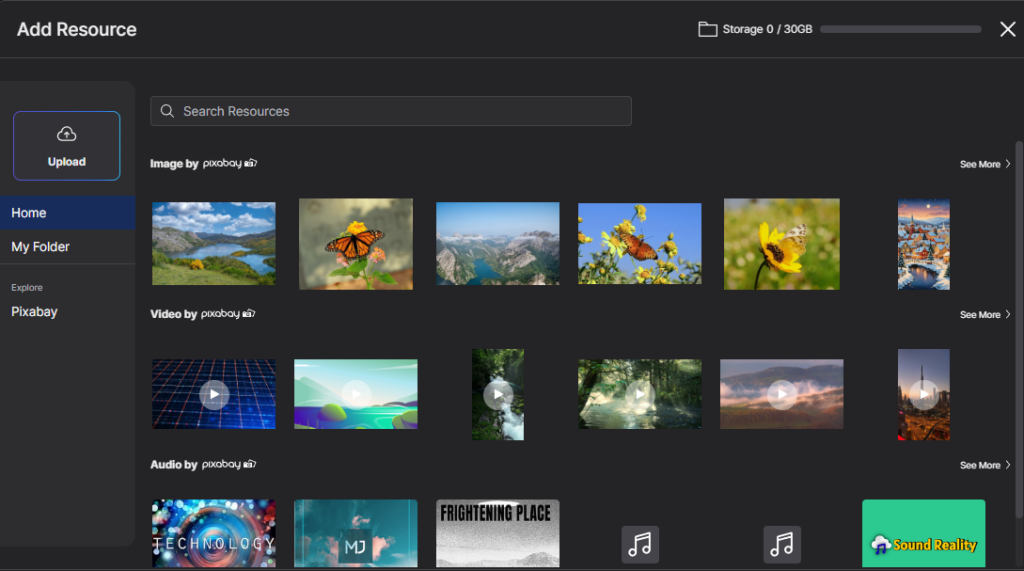
The “Time-Saver” Integration The killer feature is the Asset Library. Lovo integrates directly with Pixabay and Unsplash.
- The Workflow: You generate a sentence about “New York City.” You immediately type “New York” in the media tab, drag a free stock video onto the timeline, and trim it to match the audio length.
- Result: You never leave the tab. No downloading from stock sites, no file management hell.
C. AI Writer & Script Gen ✍️
Lovo includes a built-in AI writer (powered by GPT technology) to help you generate scripts.
- Is it better than ChatGPT? Honestly? No. It is essentially a wrapper for standard LLMs.
- Is it useful? Yes, because of convenience. You can select a template like “YouTube Top 10 List” or “Explainer Video,” and it will format the output directly into the Genny text blocks.
- Pro Tip: Use it for drafts, but always polish the script manually. AI writers tend to be repetitive.
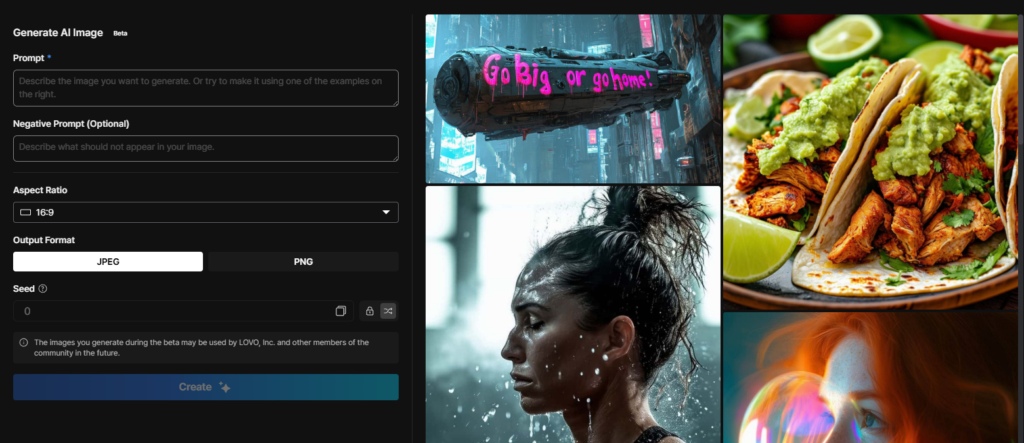
D. AI Art Generator 🎨
Sometimes, you can’t find the right stock footage. Maybe you need an image of a “Cyberpunk Cat in a Spacesuit.” Lovo has a text-to-image generator built into the sidebar.
- Quality: It is comparable to Midjourney v4 or Stable Diffusion.
- Use Case: Perfect for creating unique thumbnails or B-roll for abstract concepts where real stock footage doesn’t exist.
EE. Voice Cloning: The Achilles’ Heel 📉
I have to be brutally honest here. If you are buying Lovo AI specifically for its Voice Cloning capabilities, you might be disappointed.
While the “Pro” stock voices in their library are fantastic, the custom voice cloning technology feels a generation behind the competition.
The Test Results: I uploaded high-quality audio samples (studio microphone, no background noise) to create a clone of my voice.
- The Result: The output sounded robotic and “tinny.” While it captured the general pitch of my voice, it completely lost the warmth, texture, and natural cadence.
Another Dealbreaker: No “Director Mode” 🚫 There is a second major limitation. Remember the amazing [excited] or [whispering] text commands I mentioned earlier? They do not work on cloned voices.
When you use a custom voice, you lose all ability to direct the performance. You cannot control the emotion, speed, or style via prompt. You are stuck with one static, monotonous delivery style, which makes the feature useless for dynamic storytelling.
The Verdict:
- Don’t use it for: Professional narration, audiobooks, or your main YouTube voiceover. The quality drop is noticeable, and the lack of emotional control is a dealbreaker.
- Use it for: Temporary placeholders or very short, low-stakes internal videos where quality is not the priority.
My Advice: Use Lovo for its excellent video editor and its vast library of pre-made “Pro” voices (which support full emotional control). But if you need top-tier quality, stick to elevenlabs ai voice cloning and import the file into Genny later.
4. Audio Quality Test (Show, Don’t Tell) 🎧
Marketing pages will always show you the “cherry-picked” best results. But how does Lovo sound in the wild, without post-production or background music hiding the imperfections?
I ran a series of “Stress Tests” on the Pro Voice Library to see how it handles different speakers, emotions, and difficult sentences.
A. Standard Narration (Male, Female & Child)
For 90% of users (YouTubers and L&D creators), the most important factor is consistency. The voice needs to sound engaging but stable enough to listen to for 10 minutes.
The Test: I used the top-rated “Pro” voices without any special direction prompts.
[Audio Placeholder: Standard Voice Samples]
- Track 1 (Male – “Paul”): “In today’s video, we are going to explore the top 10 hidden mysteries of the ocean.” (Deep, documentary style).
- Track 2 (Female – “Sophia”): “Please ensure you have completed the safety module before proceeding to the next chapter.” (Clear, corporate tone).
- Track 3 (Child – “Kyle”): “Mom, look what I found in the backyard!” (Higher pitch, youthful energy).
- Verdict: The Male and Female voices are industry-standard—crisp, clear, and indistinguishable from human narration on YouTube. The Child voice is impressive; most AI models sound like adults pitched up, but Lovo captures the actual timbre of a younger speaker.
B. The “Emotion” Test (Neutral vs. Directed) 🎭
This is the real test of the new AI Direction feature we discussed. Can the AI actually act?
I took the same sentence: “I didn’t think it would end like this.” and applied three different direction prompts.
[Audio Placeholder: Emotion Comparison]
- Track 1 (Neutral): Straight reading. Sounds like a news anchor.
- Track 2 (
[Sad, whispering]): The voice drops in volume, adds breathiness, and slows down. (Very convincing).- Track 3 (
[Angry, shouting]): The voice raises pitch and intensity. (Mixed results).
My Honest Critique:
- Where it shines: The Whispering and Sad prompts are phenomenal. The AI adds natural pauses and “shakiness” to the voice that sells the emotion perfectly.
- Where it struggles: When you force the AI to Shout or be extremely Excited, it sometimes hits the “Uncanny Valley.” You might hear a slight metallic “buzz” on loud vowels. It is better to aim for “intense” rather than “loud.”
C. The “Speed Run” (Pacing Issues) 🏃
One common issue with AI is that it doesn’t know when to breathe if you type a long paragraph without punctuation.
The Test: A 50-word paragraph with zero commas.
- Result: Lovo actually handles this better than most. The “Pro” models insert micro-pauses automatically where a human naturally would, preventing the “auctioneer effect.” However, I still recommend adding commas manually to control the rhythm perfectly.
The Verdict on Quality
- Realism Score: 8.5/10
- Consistency: 9/10
- Acting Ability: 7.5/10
If you stick to the “Pro” voices and use the direction prompts for subtle emotions (curiosity, hesitation, whispering), your audience will not know it is AI. If you try to make it scream in a horror movie, it might break the immersion.
5. Tutorial: How to Create a Video in Lovo in 5 Minutes ⏱️
We have talked about the technology; now let’s put it to work.
Many people are intimidated by video editing. They think they need to learn complex software like Premiere Pro. Genny eliminates that barrier.
Here is my exact workflow to go from a “blank page” to a “finished YouTube Short” in under 5 minutes.
Step 1: Start a New Project 🆕
When you log in, the dashboard is clean.
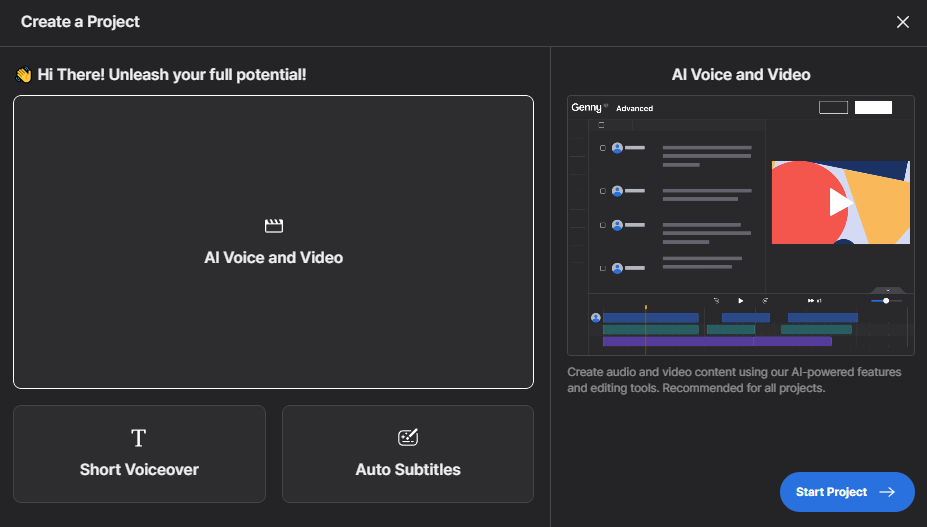
- Click “Create a Project”.
- Select “Ai Voice and Video” and click “Start Project” to open the timeline.
- Important: You start with a blank timeline. You are the director here—you won’t find a “Travel Vlog Template” to just fill in. You build the story yourself using the tools below.
Step 2: Generate the Script (The Blueprint) 📝
You don’t need to leave Lovo to use ChatGPT.
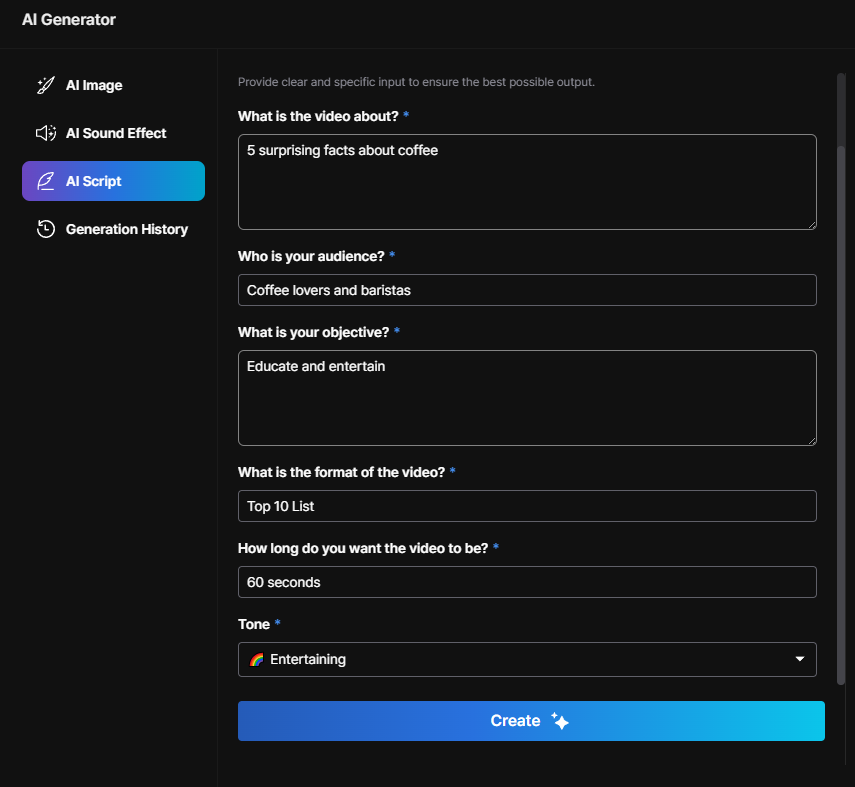
- Click the “AI Generator” icon on the left sidebar.
- Select the Template: Click on “YouTube Video”.
- Fill in the Details: The AI needs context to write a good script. You will see these specific fields:
- What is the video about? (e.g., “5 surprising facts about coffee”).
- Who is your audience? (e.g., “Coffee lovers and baristas”).
- What is your objective? (e.g., “Educate and entertain”).
- What is the format of the video? (e.g., “Top 10 List” or “Explainer”).
- How long do you want the video to be? (e.g., “60 seconds”).
- Tone: (e.g., “Entertaining” or “Professional”).
- Click Create. The AI will generate a structured script for you.
Step 3: Cast Your Actor 🗣️
Once the script is generated, click “Add to Project”. It will appear on your timeline as text blocks.
- Click on the voice avatar of the first text block.
- Browse the “Pro” tab and select your voice (e.g., “Paul” or “Sophia”).
Step 4: Add Visuals (The “Magic” Step) 🖼️
Since there are no graphical templates, you build the visual layer using stock assets.
- Go to the “Media” tab (Pixabay/Unsplash integration).
- Type your keyword: “Coffee beans.”
- One-Click Add: Hover over the video you like and click “Add to Project”.
- The video will automatically appear on the timeline. You can then trim the edges to match the audio perfectly.
Step 5: Generate Subtitles (Crucial for Social Media) 💬
Genny does not generate subtitles during export—you must do it on the timeline.
- Go to the “Subtitles” tab in the sidebar.
- Click “Auto Subtitles”.
- Select the language (e.g., English US) and click Generate Subtitles.
- The captions will appear as a new track on your timeline. You can edit the font, color, and size to match your brand style.
Step 6: Render & Export 🚀
- Hit the Play button to preview your work.
- If everything looks good, click Export in the top right corner.
- Choose your resolution (1080p is standard) and format (MP4), then download your video.
6. Pricing: Is It Worth the Money? 💰
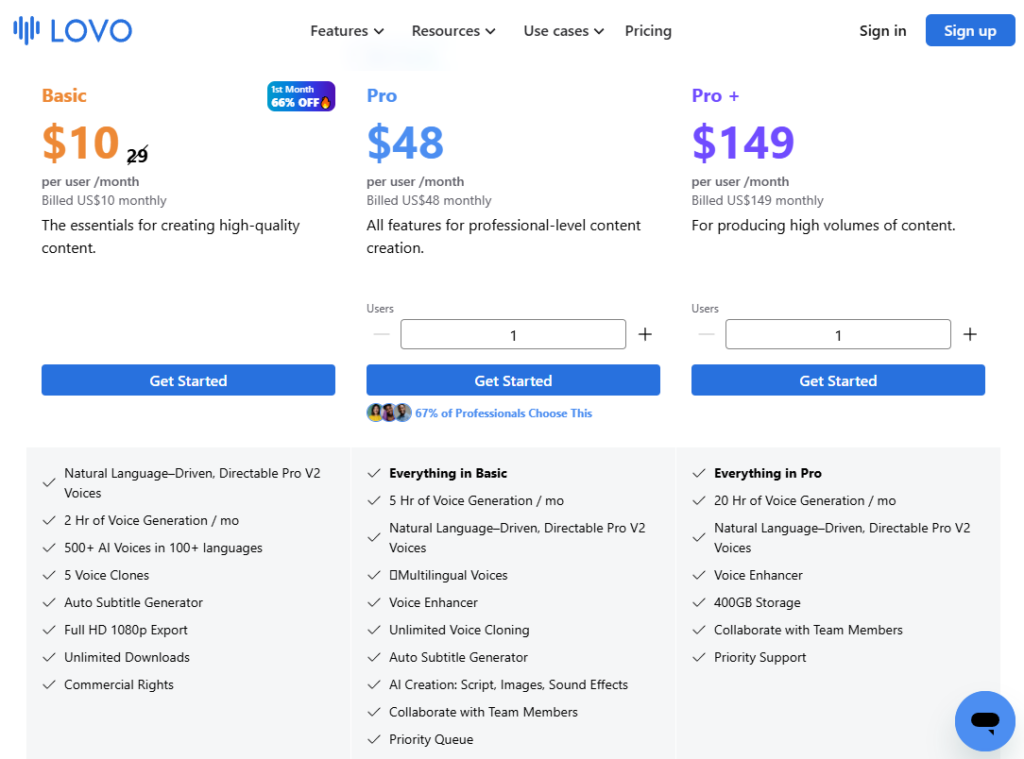
Pricing is often the make-or-break factor. Is Lovo AI expensive? Compared to a standard $15/month Spotify subscription, yes. Compared to hiring a voice actor for $200 per hour, it is dirt cheap.
However, Lovo’s pricing structure can be a bit confusing because it relies on “Credits” (minutes of generation). Here is the breakdown so you don’t overpay.
The Plans at a Glance 📋
The “Hidden” Costs & Rules You Must Know ⚠️
Before you pull out your credit card, there are three critical rules about Lovo’s economy that you need to understand.
1. The “Generation” Trap Lovo deducts credits based on audio generation, not video export.
- Scenario: You type a sentence and click “Generate.” That costs credits. You don’t like the tone, so you change the emotion and click “Generate” again. That costs credits again.
- Warning: If you are a perfectionist who re-generates every sentence 10 times, you will burn through your 2-hour limit in 20 minutes.
2. The Rollover Policy (Read this!) Does unused time roll over to the next month? No. If you pay for the Pro Plan (5 hours) and only use 1 hour, the remaining 4 hours expire at the end of the billing cycle. They do not stack.
- Strategy: If you have credits left at the end of the month, pre-generate content for the next month before they vanish.
3. Commercial Rights If you are on the Free Plan, you strictly cannot use the audio for monetized YouTube channels, ads, or affiliate marketing videos. You technically don’t own the audio.
- Once you upgrade to Basic or higher, you own the rights forever—even if you cancel your subscription later.
My Recommendation: Which Plan Should You Pick? 🏆
❌ Avoid the “Basic” Plan if you are a YouTuber. Why? Because 2 hours (120 minutes) of generation is not 120 minutes of finished video. After re-takes, edits, and experiments, 120 minutes of credits usually results in about 15-20 minutes of final video content. That is only 1 or 2 videos a month.
✅ The “Pro” Plan is the Sweet Spot. For ~$48/month (or less if billed yearly), you get 5 hours of credits.
- Capacity: This is enough to produce roughly 4-8 high-quality YouTube videos per month.
- Priority Queue: Your videos render faster (crucial for 1080p exports).
- AI Writer: Unlimited access to the script generator.
The Verdict: If you are serious about automating a Faceless Channel, the Pro Plan is the minimum viable investment. If you are just making memes for TikTok, Basic is fine.
7. Lovo AI vs. The Competition 🥊
No Lovo AI review would be complete without comparing it to the other giants in the room. The AI voice market is crowded, but usually, it comes down to three names: Lovo, ElevenLabs, and Murf.
Which one should you choose? It depends entirely on what you are building.
Round 1: Lovo AI vs. ElevenLabs
This is the most common comparison.
- ElevenLabs is a specialized Audio Research Lab.
- Lovo is a Content Creation Suite.
The Core Difference: ElevenLabs offers slightly superior audio fidelity. Its voice cloning is virtually perfect, and the emotional range is wider. However, ElevenLabs is just an audio tool. If you use it, you still need to download the MP3, open a video editor (like Premiere), find stock footage, and sync it manually.
Lovo trades a small percentage of audio realism for a massive gain in workflow speed. Because it has a video timeline and stock library built-in, you can finish a video in Lovo before you would even finish downloading the files in ElevenLabs.
The Verdict:
- Choose Lovo AI if: You are a YouTuber or Marketer who needs to produce full videos (visuals + audio) quickly.
- Choose ElevenLabs if: You are an Author looking for the best ai audiobook generator or a developer needing the absolute best API.
- Read more: ElevenLabs Guide
Round 2: Lovo AI vs. Murf AI
These two are much closer competitors. Both have a “timeline” view and target the business/e-learning market.
The Core Difference:
Murf AI is excellent but feels more “Corporate.” It is great if you specifically need voice over with powerpoint.
Lovo (Genny) feels more “Creative.” It edges out Murf because of its Generative Features.
- AI Art: Lovo lets you generate images for your video; Murf does not.
- AI Writer: Lovo helps you write the script; Murf focuses mostly on the voice.
- The Library: In my testing, Lovo’s integration with Pixabay/Unsplash felt smoother and more robust than Murf’s stock options.
The Verdict:
- Choose Lovo AI if: You want a “Creative Partner” that helps you generate visuals and scripts, not just voices.
- Choose Murf AI if: You strictly want to do corporate presentations and prefer a simpler, slide-based interface.
Summary Comparison Table
| Feature | Lovo AI (Genny) | ElevenLabs | Murf AI |
| Primary Focus | Video Creation | Pure Audio | Business Presentations |
| Audio Quality | ⭐⭐⭐⭐ (Great) | ⭐⭐⭐⭐⭐ (Best) | ⭐⭐⭐⭐ (Great) |
| Video Editor | ✅ Yes (Advanced) | ❌ No | ✅ Yes (Basic) |
| Voice Cloning | ⚠️ Average | 🏆 Best | ⚠️ Average |
| Generative AI | ✅ Art & Writer | ❌ No | ❌ No |
8. Pros & Cons (The Honest Verdict) ⚖️
After using Lovo AI (Genny) extensively for creating YouTube shorts and explainer videos, here is my unfiltered summary of what I loved and what frustrated me.
✅ The Pros (Why You Should Buy It)
- The “All-in-One” Workflow Efficiency: This is the biggest selling point. Being able to generate a script, convert it to audio, and overlay stock footage in a single browser tab saves massive amounts of time. You stop being a “file manager” moving MP3s around and start being a creator.
- Massive Stock Library Included: The integration with Pixabay and Unsplash is seamless. You don’t need a separate subscription to Storyblocks or Envato Elements for basic B-roll. It is all there in the sidebar, ready to drag and drop.
- Zero Learning Curve: If you have ever used Canva or PowerPoint, you already know how to use Genny. The interface is intuitive—no complex timelines, keyframes, or audio routing to worry about.
- “Director Mode” for Pro Voices: The ability to control emotion using text prompts (e.g.,
[whispering]) on the Pro stock voices is a game-changer for storytelling.
❌ The Cons (The Dealbreakers)
- Voice Cloning is “Just Okay”: As mentioned earlier, if your main goal is to clone your own voice, look elsewhere. Lovo’s cloning technology lags behind the market leader (ElevenLabs). It lacks the “Director Mode” and can sound slightly metallic.
- Cloud Rendering Delays: Because Genny is browser-based, you are at the mercy of their servers. Exporting a 10-minute video in 1080p isn’t instant. During peak hours, you might stare at a “Rendering…” bar for 10-15 minutes.
- The Free Plan is Restrictive: The free tier is strictly a “Free Trial.” You get 14 days of Pro access, but you cannot download the videos for commercial use. It is designed to let you test the tool, not to run a channel for free forever.
9. Frequently Asked Questions (FAQ) 🙋♂️
Here are the answers to the most common questions I get asked about Lovo AI.
Q: Is Lovo AI free?A: Not exactly. Lovo offers a 14-day Free Trial of the Pro features. You can generate audio and create videos to test the tool, but you cannot download or publish them for commercial use during the trial. To remove the watermarks and get commercial rights, you must upgrade to a paid plan.
Q: Can I monetize Lovo AI voices on YouTube?A: Yes, absolutely. If you are on the Basic, Pro, or Pro+ plan, you have full commercial rights to the content you create. You can monetize your videos via AdSense, sponsorships, or affiliate links without fear of copyright strikes.
- Important: You retain the copyright to your generated content forever, even if you cancel your subscription later.
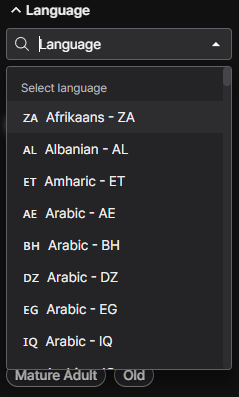
Q: Does Lovo support Polish language?A: Yes. Lovo supports over 100 languages, including Polish.
- Quality Check: The Polish voices are native-sounding and handle complex grammar well. You don’t just get one generic voice; you get multiple options (Male/Female) suitable for different contexts. This applies to most major languages like Spanish, German, French, and Japanese as well.
10. Conclusion: The Final Verdict 🏁
So, is Lovo AI (Genny) worth your money in 2025?
If you are looking for the absolute purest, highest-fidelity voice cloning on the planet, ElevenLabs is still the winner.
However, Lovo AI is not trying to be just a voice generator. It is trying to be your entire production team.
If you are a content creator who is tired of:
- Writing scripts in one tab…
- Generating audio in another…
- Hunting for stock footage in a third…
- And stitching it all together in complex video editing software…
…then Lovo AI is the best investment you can make.
It streamlines the messy, expensive process of video creation into a single, intuitive workflow. For Faceless YouTube Channels, Marketers, and Educators, it solves the biggest problem of all: Speed.
It allows you to go from “Idea” to “Uploaded Video” in minutes, not days. And in the content game, speed is everything.
Ready to stop editing and start creating?
Transparency Note: This post contains affiliate links. If you use these links to buy something, I may earn a commission at no extra cost to you. Thanks for your support!