📝 Editor’s Note (2026 Update): The AI voice market is changing rapidly. If you are looking for the absolute best tools available right now, we have just wrapped up our extensive testing of the top platforms. Check out our definitive ranking: 7 Best AI Voice Generators in 2026 (Tested & Ranked).
Table of Contents
Introduction
Have you been searching for the iconic Antoni text to speech voice in ElevenLabs, only to be met with search results showing “Antonio,” or worse—no results at all?
If so, you are not alone, and you aren’t doing anything wrong.
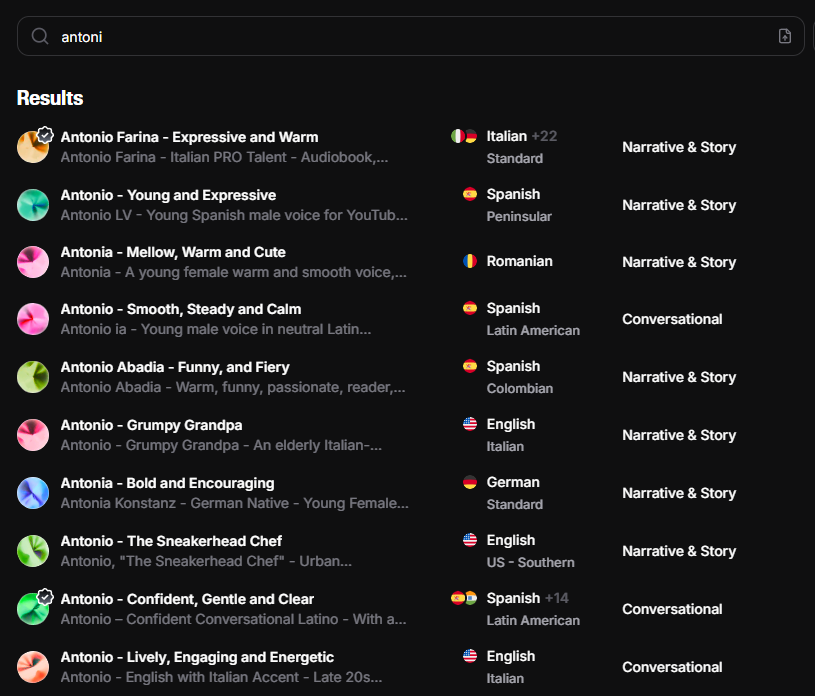
Many content creators and developers have recently noticed that the deep, American, news-anchor style voice known as “Antoni” has seemingly vanished from the default dashboard. The confusion is compounded by the existence of “Antonio,” a completely different voice profile that does not sound the same.
Here is the good news: The Antoni voice has not been deleted. It has simply been moved to the “Legacy” section as ElevenLabs rolls out newer models.
In this guide, I will show you exactly how to get him back. Whether you are a casual user or a developer, I will provide the direct Voice ID code and a step-by-step tutorial on how to restore Antoni to your VoiceLab immediately.
Don’t have an ElevenLabs account yet?
Who is the “Antoni” Voice?
Before retrieving the voice, it is important to understand why this specific model is in such high demand. Among the hundreds of AI voices available in the ElevenLabs ecosystem, Antoni remains one of the premier “News Anchor” profiles.
The Antoni text to speech model is characterized by a deep, well-rounded, and authoritative American accent. Unlike casual or conversational voices (like Adam), Antoni commands respect. It has a sophisticated tone that sounds stable and professional, making it the gold standard for specific use cases:
- Breaking News & Journalism: It sounds exactly like a TV anchor reading the evening news.
- Documentaries: The voice has enough weight to carry serious or educational narratives.
- Corporate Presentations: It conveys trust and stability.
Important Distinction: Antoni vs. Antonio
A common source of frustration for users is the similarity in naming conventions. Do not confuse Antoni with Antonio.
- Antoni: This is the legacy, deep US broadcaster voice you are looking for.
- Antonio: This is often a completely different profile found in the standard library, frequently lighter in tone or used for different regional accents (often Italian or Hispanic contexts).
If you are aiming for that classic, “CNN-style” voiceover, you specifically need Antoni (without the ‘o’ at the end).
Antoni is the gold standard for the US broadcaster sound. However, if your project targets a European audience or requires a narrator from the UK, you might want to explore British accent text to speech options instead.
How to Find Antoni in ElevenLabs (The Instant Method)
If you don’t want to dig through the “Voice Library” archives, there is a much faster shortcut. You can force the Antoni voice to appear directly inside the main Text to Speech editor, bypassing the search filters entirely.
This method works immediately, even if the voice is hidden in the UI.
Here is the 3-step “Ghost Access” trick:
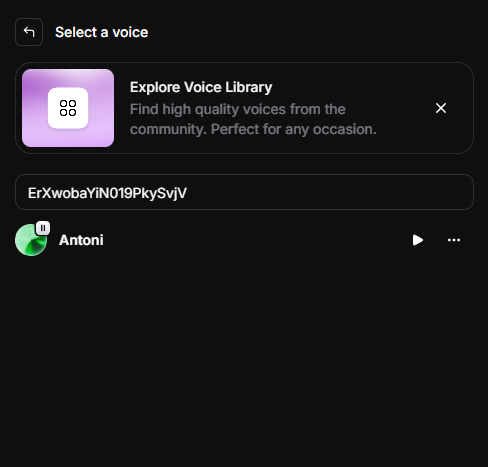
Step 1: Go to Text to Speech Log in to your dashboard and go to the main Text to Speech page (where you usually type your text).
Step 2: Open the Voice Dropdown Click on the name of the current voice (e.g., “Adam”) to open the selection dropdown menu.
- Important: Do not try to scroll down to find Antoni. He won’t be there visually.
Step 3: Paste the Voice ID In the search bar at the top of the dropdown menu, simply paste this specific code: ErXwobaYiN019PkySvjV
As soon as you paste the ID, “Antoni” will appear as the only result. Click on his name to select him.
You can now generate audio with Antoni immediately.
⚠️ Pro Tip: Since this is a Legacy voice, it might not stay in your “Recently Used” list after you refresh the page. Bookmark this article or save the ID (ErXwobaYiN019PkySvjV) in your notes, so you can paste it in again whenever you need him.
5. Best Settings for Antoni (News Style)
Now that you have successfully restored Antoni to your dashboard, the next step is configuration. While the default settings are decent, they can sometimes sound a bit too stiff or “robotic” for high-end production value.
If your goal is to create a professional voiceover that sounds like a primetime news anchor from CNN or the BBC, you need to adjust the Voice Settings to balance clarity with dynamic delivery.
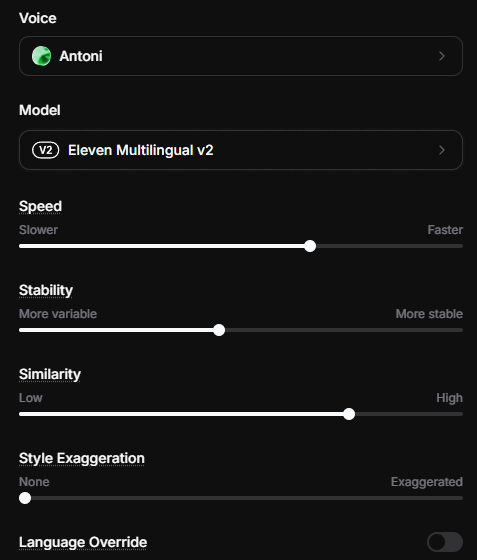
Here is my recommended “Broadcaster Blueprint” for the Antoni voice model:
1. Stability: 40% – 50%
Recommendation: Set to 45%.
- Why? Stability determines how consistent the voice sounds.
- If you set this too high (90-100%), Antoni will sound extremely consistent but very monotone and robotic.
- If you set it too low, he becomes unstable and overly emotional.
- For a news reader, you want some dynamic inflection to keep the listener engaged, so a mid-range of 40-50% is the sweet spot. It sounds human but controlled.
- Keeping the stability around 45% creates a professional rhythm that is perfect for a faceless YouTube channel focused on news, history, or true crime commentaries.
2. Similarity Enhancement: 75%
Recommendation: Set to 75%.
- Why? This slider ensures the AI adheres strictly to the original Antoni voice sample.
- We want to keep this high because Antoni’s deep timbre is his best feature.
- However, do not push this to 100%. Maximizing this slider often introduces digital artifacts, background static, or a “fuzzy” sound. 75% captures the richness of his voice without the noise.
3. Style Exaggeration: 0%
Recommendation: Set to 0% (None).
- Why? This setting attempts to boost the “style” of the delivery.
- For a news anchor, you want objectivity and neutrality. You do not want the AI to “overact” or sound dramatic. Keeping this at 0% ensures a serious, factual delivery perfect for documentaries and news briefings.
4. Speed: 1.03x
Recommendation: Set to 1.03.
- Why? This is a subtle “Pro Tip” that makes a huge difference.
- Standard AI generation can sometimes drag slightly or feel a bit lethargic. By boosting the speed just a fraction to 1.03, you give Antoni a sense of professional urgency and flow. It makes the delivery sound sharper and more intelligent, exactly like a broadcaster reading off a teleprompter.
Antoni Not Working? Top 3 Modern Alternatives
While retrieving the Antoni text to speech model is satisfying for nostalgia or specific continuity purposes, you must accept a technical reality: Antoni is a “Legacy” model.
He was trained on older datasets. ElevenLabs has since released their cutting-edge Turbo v2.5 model, which is faster and more emotionally intelligent. Because Antoni was not originally built for this new engine, he can sometimes sound slightly robotic, “buzz” at the end of sentences, or mispronounce intonations when forced through the Turbo model.
If you find that Antoni isn’t delivering the quality you need in 2025, here are the three best modern alternatives that are fully optimized for the latest engines.
1. Brian (The “Better” Antoni)
If you are looking for a direct successor to Antoni, Brian is the answer.
- Vibe: Deep, American, Narration-focused.
- Why choose him: Brian occupies the exact same sonic frequency as Antoni—authoritative and trustworthy—but with significantly higher audio fidelity. He breathes more naturally and handles complex punctuation much better than Antoni. He is currently the gold standard for documentary-style narration.
2. Adam (The Versatile King)
You have definitely heard this voice before. Adam is arguably the most popular AI voice on the internet for a reason.
- Vibe: Deep, Conversational, Engaging.
- Why choose him: While Antoni is strictly a “News Anchor,” Adam can do it all. He can sound authoritative for news, but also relaxed for a podcast or YouTube tutorial.
- Guide: If you want to master this voice, check out my full guide on Best ElevenLabs Adam Voice Settings to see how to fine-tune him for storytelling.
3. Callum (Deep & Intense)
If Antoni feels a bit too “safe” or “corporate” for your project, Callum is the upgrade you need.
- Vibe: Gritty, Dramatic, Cinematic.
- Why choose him: Callum has a unique texture and “gravel” in his voice that Antoni lacks. He is perfect for movie trailers, dramatic readings, or video game characters where you need intensity rather than just information.
Ready to use these pro voices commercially? The high-fidelity versions of Brian, Adam, and Callum perform best on the ElevenLabs Creator Plan. Unlock higher usage limits and faster rendering.
Final Thoughts: Antoni is Hidden, Not Gone
To summarize, the rumors of the Antoni text to speech model’s death have been greatly exaggerated. While ElevenLabs has moved him to the “Legacy” archive to make room for newer, more emotive voices like Turbo v2.5, he is still fully functional and available for use in 2025.
You do not need to settle for “Antonio” or other look-alikes. By using the Legacy Filter method or simply pasting the unique Voice ID (ErXwobaYiN019PkySvjV) into the search bar, you can restore that classic, deep American news anchor voice to your dashboard in seconds.
Whether you stick with Antoni for his stability or upgrade to Brian for higher fidelity, the choice is now back in your hands.
If you find that ElevenLabs is slightly out of your budget for this project, or you need a different set of features, you can also check my Murf AI review to see how other top-tier generators compare.
Frequently Asked Questions (FAQ)
Here are the most common questions regarding the Antoni voice model:
Q: Is the Antoni voice free to use?
A: Yes. The Antoni voice profile is available on the ElevenLabs Free Plan. You do not need a paid subscription to access the “Legacy” or “Premade” voices. However, you do need a registered account to generate the audio.
Q: Can I use the Antoni voice for monetization (YouTube/Ads)?
A: It depends on your plan. If you are using the Free Plan, you cannot use the audio for commercial purposes (including monetized YouTube channels) without giving attribution to ElevenLabs. To own the full commercial rights to the audio generated with Antoni (and to skip the attribution requirement), you must be subscribed to at least the Starter or Creator plan.
Transparency Note: This post contains affiliate links. If you use these links to buy something, I may earn a commission at no extra cost to you. Thanks for your support!