🚀 Speed Up Your Workflow: Tired of switching between ChatGPT and your video editor? Discover tools that combine scriptwriting, voice, and editing in one place. Read our guide to the Best AI Tools for Faceless Channels.
Table of Contents
1. Introduction: The “Unread Library” Problem
We all have that folder on our computer or phone. It is filled with dozens—maybe hundreds—of EPUB files: bestsellers, business guides, and classic novels that we promised ourselves we would read.
But the reality of 2025 is that sitting down to read is a luxury.
Between long commutes, household chores, and the sheer exhaustion of staring at screens for 8 hours a day (“Screen Fatigue”), those books remain unread. You want the knowledge and the entertainment, but you physically cannot find the time to consume the text.
The solution is simple: Stop reading. Start listening.
By converting your EPUB files into audio, you unlock “dead time.” Suddenly, a traffic jam becomes a chapter of a thriller. A session at the gym becomes a lesson on economics.
“But I Hate Robot Voices…”
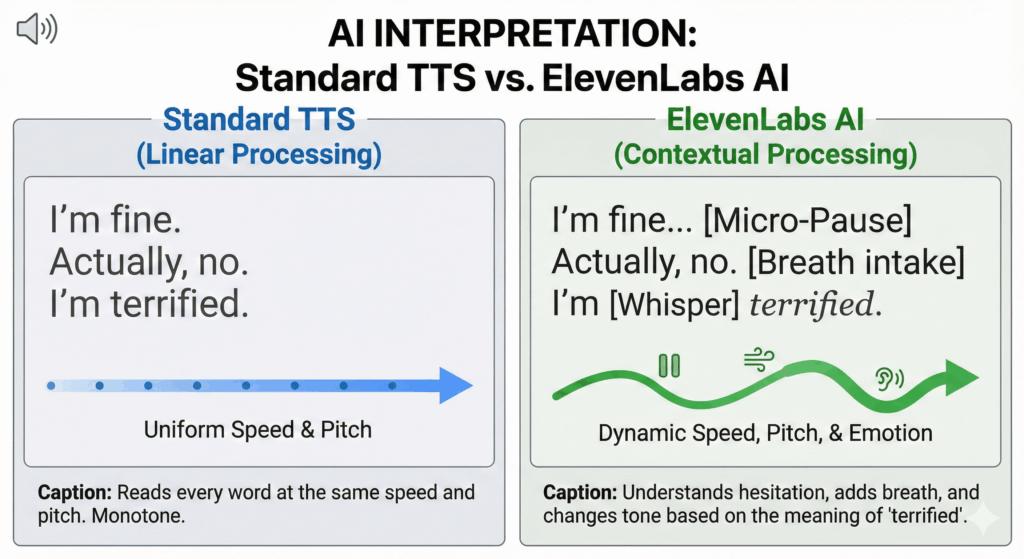
If you tried converting text to speech (TTS) five years ago, you probably have a bad memory of it. Old-school TTS engines (like the default Siri or Google Assistant voice) were flat, monotonous, and mispronounced simple words. They read words linearly, ignoring the meaning behind them.
That era is over.
Thanks to Generative AI, modern engines don’t just “read” text—they perform it. They analyze the context to insert pauses, breaths, and tone shifts automatically.
See the difference in how they process a simple sentence:
This isn’t sci-fi. This is what the tool does automatically. It turns a flat text file into a 3D audio experience.
What You Will Learn in This Guide
We are not just going to give you a list of apps. We have tested the market to give you the three best workflows depending on your needs and budget.
In this guide, you will learn:
The Premium Method (AI): How to get Netflix-quality narration for your books using tools like ElevenLabs. (Best for fiction and long listening sessions).
The Free Method (Native): How to unlock the hidden accessibility features already on your iPhone and Android. (Best for saving money).
The Technical Method (Offline): How to convert EPUB files to MP3 for old-school MP3 players or car stereos.
Let’s turn your digital library into a personal podcast.
2. Why Convert EPUB to Audio? (The Benefits)
You might be thinking: “Is it really worth the effort to convert files? Why not just buy the audiobook on Audible?” The answer is simple: Cost and Availability. Most EPUBs in your library (PDF reports, indie books, old downloads) don’t have official audio versions. And even if they do, buying them all would cost a fortune.
Here is why converting your own files is a superpower.
1. Accessibility: A Game-Changer for Neurodiversity
For millions of people, reading black text on a white screen is physically or cognitively draining.
Dyslexia & ADHD: Standard reading requires intense focus to decode letters. Listening bypasses that “decoding” stage, allowing the brain to focus purely on the information and narrative.
Visual Impairment: Text-to-speech isn’t a luxury; it’s a necessity.
The AI Advantage: Unlike old screen readers that sounded robotic (increasing cognitive load), modern AI voices breathe and pause naturally. This makes long listening sessions comfortable, not exhausting.
2. Productivity: The “Dead Time” Hack
We all have hours in our day that feel wasted—commuting, washing dishes, folding laundry, or walking the dog. These are what productivity experts call “Dead Time.”
By converting your EPUBs to audio, you reclaim this time. Let’s look at the math:
Average commute: 45 minutes/day.
Household chores: 30 minutes/day.
Total: 1 hour 15 minutes per day.
That is nearly 9 hours a week of extra reading time. That is enough to finish one average-sized book every single week, without ever sitting down on a couch.
Feature
Traditional Reading (Eyes)
Audio Listening (Ears)
When?
Only during dedicated free time
Commute, Gym, Chores, Driving
Multitasking
Impossible (Requires 100% focus)
Yes (Hands-free productivity)
Time Potential
~30 mins / day
~2-3 hours / day (3x More)
3. Retention: The Science of “Immersion Reading”
There is a myth that listening is “cheating” and that you retain less information than reading. Science suggests otherwise—especially when you combine both.
This is called Immersion Reading (or Dual Coding). When you listen to the audio while following the text with your eyes:
Focus spikes: The audio keeps you moving forward, preventing your mind from wandering.
Comprehension improves: Hearing the intonation helps you understand complex sentences better.
Speed increases: You can often listen at 1.5x speed while reading, consuming content faster than your eyes could move alone.
By converting your EPUB to a high-quality audio file, you give yourself the option to learn faster and deeper.
3. Method 1: The Best Quality AI Converters (Recommended)
If you are listening to a textbook, a robotic voice might be fine. But if you are trying to enjoy a novel, a biography, or a thriller, you need performance, not just reading.
This is where ElevenLabs currently dominates the market. Unlike standard converters, its AI understands the emotional context of the scene—whispering when characters are scared and shouting when they are angry.
Here are the two ways to use it.
A. The ElevenLabs Reader App (Mobile)
Best for: Fiction, Novels, and listening on your phone.
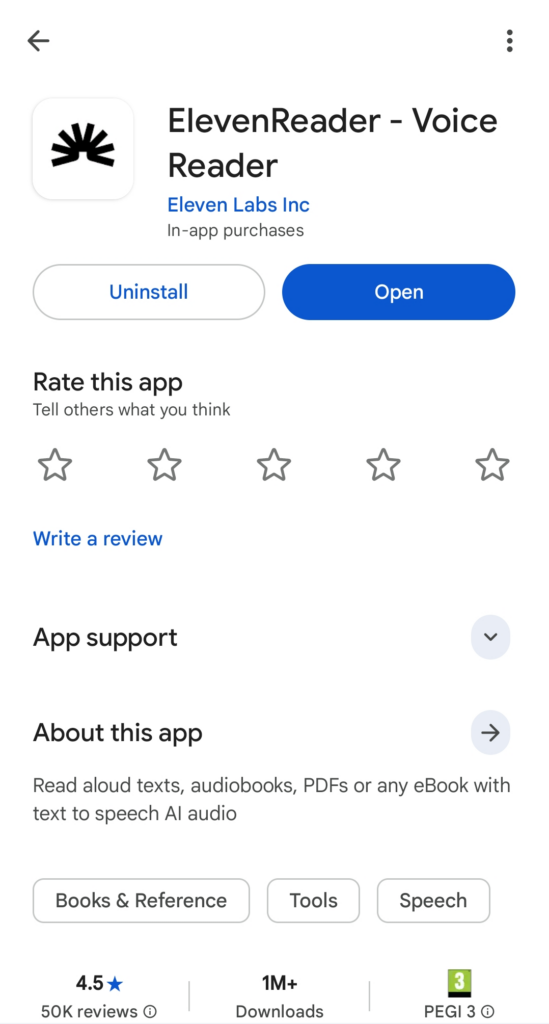
Recently, ElevenLabs released a dedicated mobile app (available on iOS and Android). This is the absolute fastest way to turn an EPUB into an audiobook. You don’t need to convert files manually; the app does it in real-time.
Why it wins:
Context Awareness: It handles dialogue perfectly. It knows which character is speaking and adjusts the tone accordingly.
Zero Wait Time: You don’t have to wait for the whole book to render. You just press play.
Massive Voice Library: You can assign specific voices to your books—a gritty narrator for a crime thriller or a soft voice for romance.
How to use it:
Download “ElevenLabs Reader” from the App Store or Google Play.
Upload your EPUB file directly from your phone’s files.
Choose a voice and hit Play.
B. The Web Dashboard Approach (For MP3 Files)
Best for: MP3 Players, Car Stereos (USB), and Archiving.
If you want a physical audio file (MP3) that you can transfer to an old iPod, burn to a CD, or listen to offline without an app, use the web dashboard.
Step-by-Step Guide:
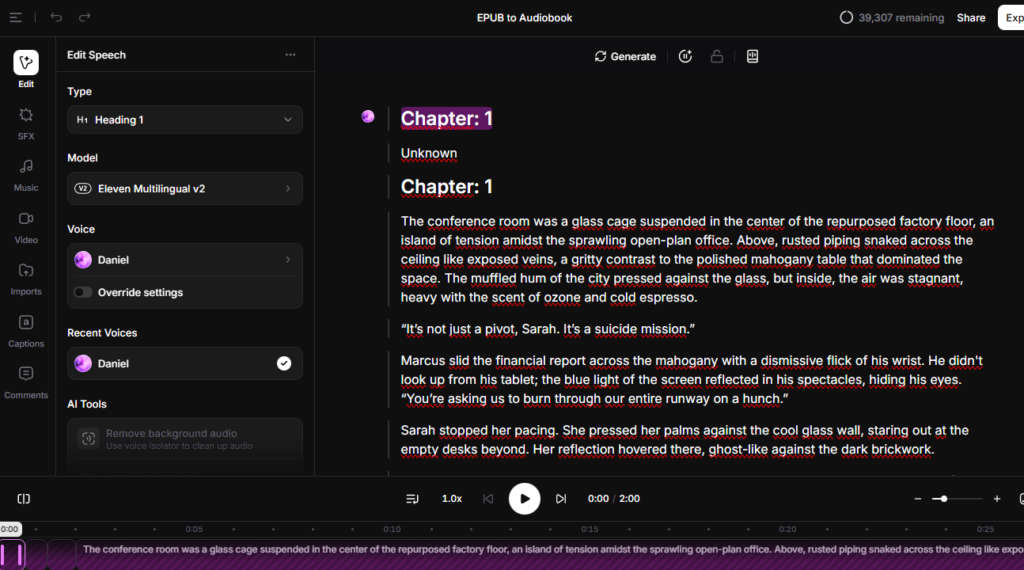
Go to “Studio”: Log in to the ElevenLabs website and select the Studio tab. Then click “New Audiobook”
Import your EPUB: Upload your EPUB file and click Create Project.
Select Your Narrator: This is crucial. The voice sets the mood.Pro Tip: Want to make your fantasy novel sound like a BBC drama? Use a UK voice profile. Check our guide on British Accent Text to Speech to find the perfect narrator for your books.
Click “Create New Project”: upload your EPUB file. The AI will automatically split it into chapters.
Export & Download: Click “Export”. Once finished, you can download the entire book as a single audio file or as separate chapters.
Instead of using external converters, you can upload your EPUB files directly into the ElevenLabs ‘Projects’ tab. The AI will organize it into chapters for you. See the workflow in action: How to Use ElevenLabs.
While we recommend generative AI for the highest quality, dedicated “Reader Apps” are a strong alternative if you value workflow over cinematic audio. These apps are designed specifically for consuming content on the go.
Here are the two heavyweights in this space.
A. Speechify
Best for: Students and users who need to scan physical books.
Speechify is the most advertised tool on the market. It is famous for its “Celebrity Voices” (like Snoop Dogg or Gwyneth Paltrow).
The Pros:
OCR Scanning: You can take a photo of a physical book page, and it will read it aloud.
Cross-Platform: Syncs perfectly between Chrome and Mobile.
Speed: It is optimized for “Speed Listening” (up to 4.5x speed) for productivity junkies.
The Cons:
The Cost: The Premium plan is quite expensive compared to other tools. Is it really worth the price tag? Read our full Speechify Review to see a detailed breakdown of the features vs. cost.
The “Gimmick” Factor: While celebrity voices are fun for 5 minutes, they can feel unnatural for a 10-hour novel. They often lack the subtle emotional shifts required for fiction.
B. Voice Dream Reader
Best for: iOS Power Users and Library Management.
For years, this was the “Gold Standard” for accessibility. It is less flashy than Speechify but incredibly robust for managing large libraries of EPUBs and PDFs.
The Pros:
Format Mastery: It handles complex EPUB formatting (tables, footnotes, citations) better than almost any other app.
Visual Controls: You can customize the font, spacing, and colors to match the audio, which is great for dyslexic readers.
Offline Use: It works reliably without an internet connection.
The Cons:
Audio Quality: It relies primarily on standard system voices (like Siri-enhanced or older Acapela voices). While clear, they sound significantly more “robotic” than the modern Neural/Generative voices from ElevenLabs. It feels more like a utility than a performance.
5. Method 3: The “Free” Way (Native Accessibility Tools)
If you are on a strict budget or just need to listen to a short PDF report, you don’t necessarily need to pay for an app. Your smartphone already has powerful accessibility tools built-in. They were originally designed for the visually impaired, but they work perfectly for audiobooks.
A. iOS Spoken Content (iPhone/iPad)
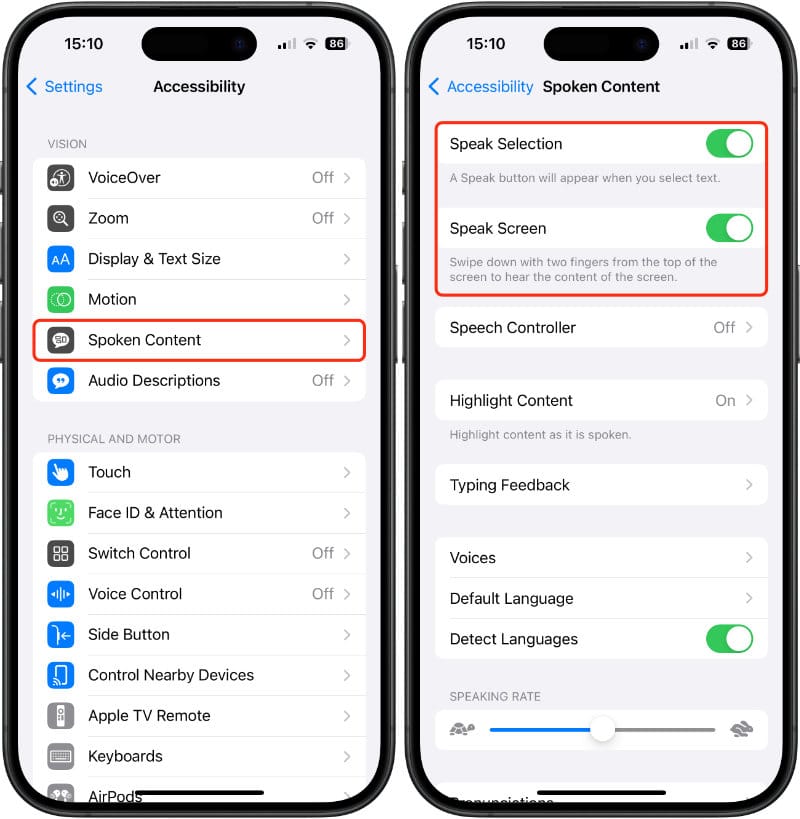
Apple has a hidden feature called “Speak Screen” that works surprisingly well with Apple Books and Kindle.
How to enable it:
Go to Settings ➡️ Accessibility.
Tap on Spoken Content.
Toggle “Speak Screen” to ON.
How to use it: Open your EPUB file in the Apple Books app. Swipe down with two fingers from the very top of the screen. A small controller will appear, and Siri will start reading the page to you.
Source: www.siriuserguide.com
B. Android (Google Play Books)
Android users have an even easier solution built directly into the default reading app. You don’t need to mess with complex “TalkBack” settings.
How to use it:
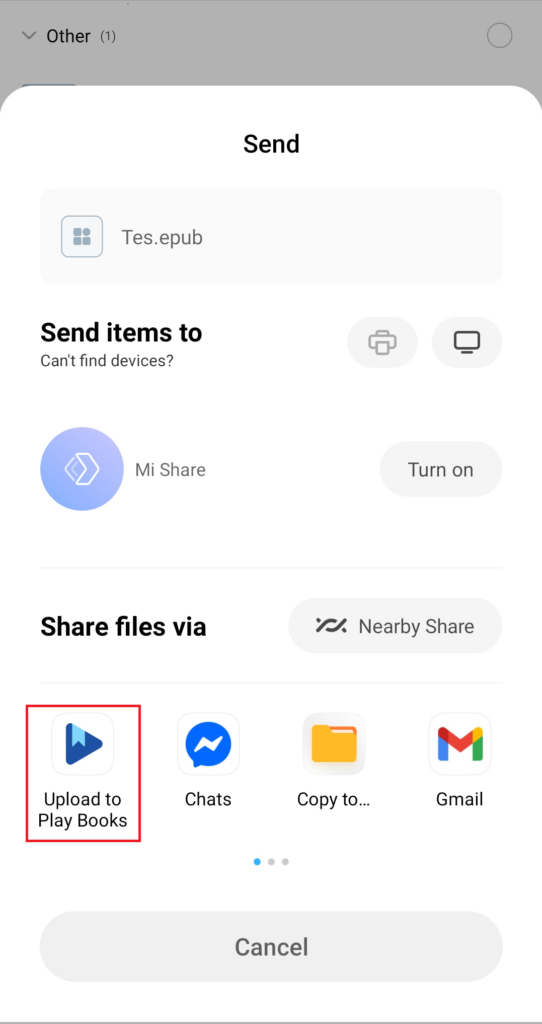
Upload your EPUB to Google Play Books.
Open the book.
Tap the “Aa” (Settings) icon or the three dots menu.
Select “Read Aloud”.
Google’s “Reading Voice” is clearer than Siri but can sound a bit disjointed over long periods.
💡 The Verdict: Free vs. Paid
Is the free route worth it?
Good for: Textbooks, whitepapers, news articles, and studying. If you just need the raw information, this is enough.
Bad for: Novels, Stories, and Fiction. The native voices lack “prosody” (the musicality of speech). They read a romantic confession with the same tone as a grocery list. It breaks the immersion.
If you want to get lost in a story, stick to Method 1 (ElevenLabs). If you just want to cram for an exam while walking to class, Method 3 is your best friend.
7. Pro Tips for the Best Listening Experience
Generating the audio is only half the battle. To truly enjoy the book—especially if it is a 20-hour fantasy epic or a dense business guide—you need to tweak the experience. Here are three secrets used by power users.
1. The “1.25x” Rule (Speed Listening)
Most AI voices articulate words much more clearly and slowly than humans do in casual conversation. Listening at default speed (1.0x) can sometimes feel dragging or hypnotic, making your mind wander.
The Fix: Don’t be afraid to bump the speed.
Sweet Spot: Most users find 1.2x to 1.5x to be the perfect balance. It keeps the energy up and forces your brain to stay engaged, but it is not so fast that you lose the emotion.
Note: If you are using the ElevenLabs Reader App, this setting is right on the player screen.
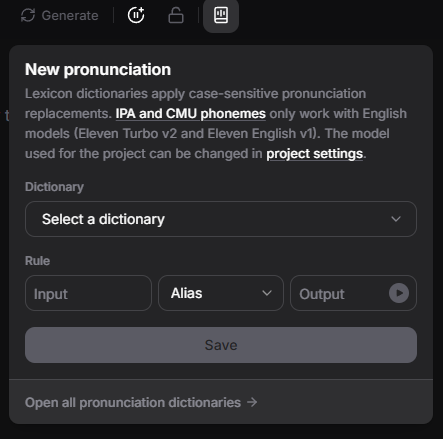
There is nothing worse than an AI mispronouncing the main character’s name every 30 seconds. If you are converting a fantasy or sci-fi book with made-up names (e.g., “Targaryen” or “Cthulhu”), the AI might guess wrong.
How to fix it: Inside ElevenLabs, use the Pronunciation Dictionary feature before generating the audio.
Input: The word as written (e.g., Hermione).
Output: The phonetic spelling (e.g., Her-my-oh-nee).
This ensures consistency throughout the entire 10-hour audiobook.
The narrator makes or breaks the story. If you are listening to a classic novel or a fantasy epic, a standard American voice might feel out of place. To give your book a cinematic, BBC-style atmosphere, we recommend using a UK profile. Check our specific guide on British Accent Text to Speech to find the perfect voice for your genre.
8. Important Warning: Copyright & Personal Use ⚖️
Before you start converting your entire library, we need to address the legal elephant in the room. Disclaimer: We are tech experts, not lawyers. This is not legal advice.
Personal Use (Format Shifting) ✅
In many jurisdictions, converting a file you legally own into a different format for your own personal accessibility is considered “Format Shifting” (similar to ripping a CD you bought onto your iPod).
If you bought the EPUB.
If you are converting it solely to listen to it yourself.
This is generally acceptable. You are simply changing how you consume content you paid for.
Distribution is Illegal ❌
Here is where the line is drawn. You absolutely cannot share, upload, or sell the audio files you generate.
You cannot send the MP3 to a friend.
You cannot upload it to YouTube.
You cannot sell it on a website.
Doing so violates the copyright of the author and publisher. AI tools grant you commercial rights to the voice, but they do not grant you copyright to the text you are processing.
🛑 Are You the Author?
If you wrote the book and are looking to create an audiobook to sell on Audible, Spotify, or Apple Books, this guide is not for you. The methods above are for private listening only.
For Authors & Publishers: Are you planning to monetize this audiobook? You need a completely different workflow to meet ACX technical standards.
Here are the answers to the most frequent questions readers ask about turning their digital library into audio.
Can I convert Kindle books to audio?
Yes, but not directly. Books purchased from Amazon (Kindle) usually come in proprietary formats like .azw3 or .kfx and are protected by DRM (Digital Rights Management). To convert them to audio using external tools, you first need to strip the DRM and convert the file to a standard EPUB or PDF.
The Tool: Most users rely on the free software Calibre (with the DeDRM plugin) to handle this process on their PC/Mac. Once you have a clean, DRM-free file, you can upload it to ElevenLabs or any other reader.
Is there a completely free EPUB to audio converter for PC?
Yes. If you are on Windows and don’t mind a dated interface, Balabolka is the industry standard for free offline conversion.
How it works: It uses the voices already installed on your computer (SAPI5) or free voices you download. It can save text directly to MP3.
The Catch: The audio quality will sound like standard system voices (robotic). For “human-like” quality, you need a cloud-based tool like ElevenLabs.
What is the most realistic AI voice for reading books?
For fiction and long-form storytelling, ElevenLabs is currently the undisputed leader.
Why? Unlike other engines that read sentence-by-sentence, ElevenLabs understands the context of the paragraph. It naturally adds pauses, breath, and intonation changes that match the emotion of the story.
Recommendation: For novels, try the “Eleven Multilingual v2” model with a deep British or American narrator profile.
Can I convert PDFs too?
Note: This guide is specifically for EPUB files (which are flowable and easy to convert). If you are stuck with a rigid textbook or business report in PDF format, the process is different because of columns and page numbers. Read our specific tutorial on how to use a PDF to Sound Converter properly.
10. Conclusion: Stop Reading, Start Listening
For years, book lovers had to make a painful choice: sit down to read and ignore the world, or get work done and ignore their books.
You no longer have to make that choice.
The technology has finally caught up to our busy lives. Whether you choose the free built-in tools on your phone for a quick study session, or the cinema-quality immersion of AI for your favorite novels, the result is the same: You reclaim your time.
Think about those dozens of EPUB files sitting in your folder right now. The business guides that could boost your career. The novels that could help you relax. They are currently useless to you because you can’t find the time to open them.
Don’t let your ebooks gather digital dust.
Unlock that knowledge today. You don’t need to commit to a subscription blindly. Just take one file, convert the first chapter, and listen to it on your next drive.
Transparency Note: This post contains affiliate links. If you use these links to buy something, I may earn a commission at no extra cost to you. Thanks for your support!