🎙️ Podcasting: Whether you are fixing bad audio or creating a virtual host, choosing the right tool is key. See which platform reigns supreme in our 7 Best AI Voices of 2026.
Table of Contents
If you are looking for an honest Descript review, you probably hate the traditional editing process. And I don’t blame you.
Editing podcasts, voiceovers, or “talking head” videos in traditional software like Premiere Pro or Audacity is a nightmare. You stare at audio waveforms for hours, manually cutting out every “umm,” “ahh,” and awkward silence. It’s tedious, slow, and kills your creativity.
Descript promises to change the rules of the game entirely.
The pitch is simple: Edit audio and video the same way you edit a Word document. If you delete a word in the transcript, Descript automatically cuts that segment out of the timeline.
But does it actually work seamlessly?
Most reviews focus heavily on the video aspect. In this test, I focused on Voice Creators (Podcasters and Voiceover Artists). I tested the core AI voice features—including Overdub (Voice Cloning) and Studio Sound—to see if this tool is a gimmick or a must-have in 2025.
Here is my verdict.
What is Descript? (Text-Based Editing Explained)
Before we jump into the voice features, you need to understand the core concept.
Descript is not a traditional editor. It is a transcription-based editor.
Here is the workflow:
- You drag and drop your audio or video file.
- Descript automatically transcribes it into text (with impressive accuracy even with non-english languages).
- The Magic: When you highlight a sentence in the text and press “Delete,” Descript automatically cuts that segment out of the audio/video timeline.
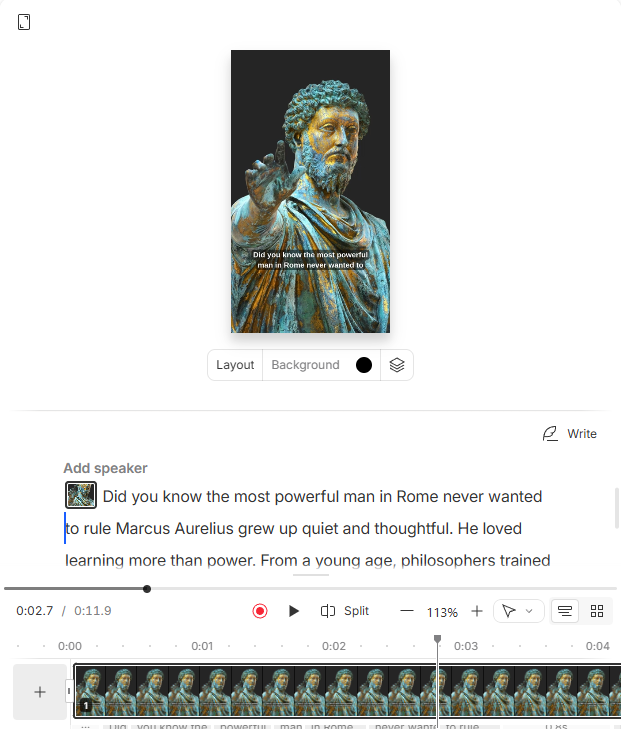
The Benefit: This feature alone saves about 80% of the time usually spent on the “rough cut.” You don’t have to listen to the whole recording to find mistakes; you just read and delete.
Feature 1: Overdub (AI Voice Cloning)
This is the feature that makes Descript unique in the “AI Voice” space.
Overdub allows you to create a digital clone of your own voice. Why do you need this? So you can fix audio mistakes by simply typing the new words, instead of setting up your microphone and re-recording the whole sentence.
Overdub is great for fixing typos, but for generating long-form content from scratch with your own voice, ElevenLabs Voice Cloning is still the industry leader in terms of realism.
The Practical Test: Fixing a Mistake
I wanted to see if it actually blends in seamlessly or if it stands out like a sore thumb.
- The Mistake: I recorded a sentence where I said “normal” instead of “special”.
- The Fix: Instead of re-recording, I just backspaced “normal” in the transcript and typed “special”. Descript generated the audio instantly using my cloned voice model.
Listen to the result:
My Verdict: Natural or Robotic?
Does it sound 100% natural? Honestly: No.
It sounds about 85-90% like me. You can hear a slight shift in tone and clarity compared to the original recording.
- Compared to ElevenLabs: The quality is noticeably lower than ElevenLabs Voice Cloning. ElevenLabs captures the “breath” and emotion better.
- The Utility: However, Descript wins on convenience. You don’t have to export/import files. You just type.
Bottom Line: Overdub is a lifesaver for fixing small, single-word mistakes (like a name or a number). But I wouldn’t recommend it for generating long paragraphs from scratch.
Feature 2: Studio Sound (AI Audio Repair)
This feature is the main reason why many podcasters subscribe to Descript.
The Problem: You don’t have a treated studio. You have a loud computer fan, traffic outside, or an echoey room. Your audio sounds amateur. The Old Solution: Spend $500 on a Shure SM7B microphone and hours learning EQ and noise gating in Audacity. The Descript Solution: One toggle called “Studio Sound.”
It doesn’t just “remove noise.” It uses AI to isolate your voice and regenerate it to sound like it was recorded in a professional booth.
The Test: Can It Fix “Bad” Audio?
I recorded a sample using my laptop microphone in an untreated room with a fan running in the background. It sounded terrible.
Then, I applied Studio Sound at 100% intensity.
1. Before (Raw Audio – Laptop Mic + Echo):
2. After (Studio Sound ON): [
Processed with Descript Studio Sound. No other effects applied.
My Verdict
The difference is night and day. The echo is gone. The hiss is gone. The voice sounds compressed and present.
Pro Tip: Sometimes at 100%, it can sound a bit too processed (synthetic). I recommend dialing the Intensity Slider down to 60-70%. This keeps some natural room tone while cleaning up the mess.
Feature 3: Removing Filler Words (The “Confidence” Button)
We all do it. When we are thinking, we say “um,” “uh,” “like,” or “you know.”
In a professional video or podcast, these filler words kill your authority. They make you sound unsure and drag out the length of your content.
The Old Way: Listening to the whole 30-minute track and manually cutting out every single “um” on the timeline. The Descript Way: Two clicks.
Here is how it works:
- Click the AI Tools button.
- Select “Remove Filler Words”.
- Descript automatically finds every instance of “um” and “uh” in your script.
- Click “Apply”, and they are instantly deleted from both the transcript and the audio.
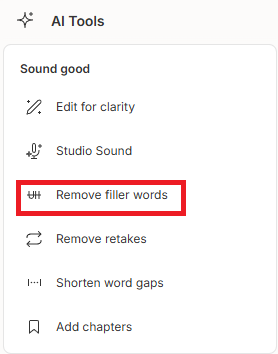
The Result: You instantly sound more articulate, concise, and professional. It turns a rambling recording into a tight, punchy clip in seconds.
Descript vs ElevenLabs (When to Use Which?)
Many creators ask: “Should I get Descript or ElevenLabs?”
This is the wrong question. They are different tools for different jobs.
Here is the simple breakdown:
ElevenLabs is for CREATION.
- Goal: You want to generate a voice from scratch (a narrator that isn’t you).
- Strength: Unbeatable audio quality, emotion, and realism.
- Use Case: Faceless channels, Audiobooks, Storytelling.
- Cloning: If you want a perfect digital clone of yourself to read entire scripts, ElevenLabs is far superior to Descript’s Overdub.
Descript is for EDITING.
- Goal: You want to fix, clean, and edit a recording of your own voice.
- Strength: Workflow efficiency (text-based editing, filler word removal).
- Use Case: Podcasts, Interviews, Talking Head videos.
- Cloning (Overdub): Good for patching small mistakes, but not for generating long-form content.
My Recommendation: Use Both
The ultimate workflow for a modern creator is to combine them:
- Generate your high-quality voiceover in ElevenLabs.
- Import that audio into Descript to sync it with visuals, remove silences, and mix it with music.
They don’t compete; they complete each other.
Step-by-Step: How to Edit Audio in Descript
If you have never used a text-based editor before, it might feel like magic. Here is the exact workflow to turn a raw recording into a polished episode in minutes.
1. Create New Project
Open Descript and click “New Project” to start.
2. Import
Simply drag and drop your video or audio file into the main dashboard area.
3. Transcribe
Descript will automatically start transcribing your file. You just need to wait a few seconds (depending on the file length).
4. Edit Text (Cut the Fluff)
Read through the transcript. If you see a sentence that doesn’t add value, highlight it and press Delete or Backspace.
- The Magic: When you delete the text, the corresponding audio/video is instantly cut from the timeline. No more hunting for “that part” on a waveform.
5. Polish (Fix the Audio)
Now, make it sound pro.
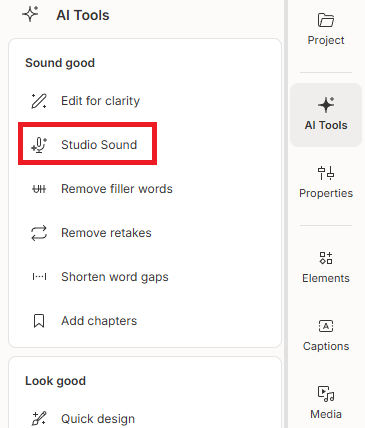
- Go to the AI Tools panel (on the right).
- Toggle “Studio Sound” to ON.
Pricing: Is Descript Worth It?
Descript offers a “Free Forever” plan, but is it enough for real work? Here is the breakdown.
| Feature | Free Plan | Hobbyist($16/mo) | Creator($24/mo) |
| Transcription | 1 hour / month | 10 hours / month | 30 hours / month |
| Watermark | Yes (on video) | No | No |
| AI Voice (Overdub) | Limited vocabulary | Limited vocabulary | Unlimited |
| Filler Word Removal | Basic (“um”, “uh”) | Basic | Advanced (18+ words) |
| Best For | Testing & Hobby | YouTubers & Podcasters | Power Users & Agencies |
Is Descript Free? (2025 Pricing Analysis)
A common question we get is: “Is Descript free to use?” The short answer is Yes, but with significant limitations that creators need to know about.
The Free Plan includes:
- 1 Hour of Transcription per month: Good for short tests, bad for regular YouTubers.
- Watermark: Video exports on the free plan have a Descript watermark.
- Overdub (AI Voice) Limits: You get a very limited vocabulary for the AI voice cloning.
- Pro Tip: If you mainly need Descript for its AI Voices (Overdub) and find them too robotic or expensive, consider ElevenLabs. It offers a generous free tier with much higher quality emotional range, which you can then import into any video editor.
My Verdict: The ROI Calculation
Ask yourself: How much is your time worth?
If you spend 5 hours a month manually cutting out “umms” and “ahhs” in a traditional editor, and you value your time at just $10/hour, you are losing $50/month.
Descript does that work in seconds for $16.
If you are serious about content creation, this tool pays for itself in the first hour of editing.
Pros & Cons
To be completely objective, here is what I loved and what frustrated me during my testing.
✅ The Pros
- Lightning Fast Workflow: Editing video by deleting text is a game-changer. It cuts editing time by 50-80%.
- Studio Sound is Magic: This feature alone is worth the price. It turns bad, echoey laptop audio into professional, studio-quality sound instantly.
- Overdub Saves Re-recording: Being able to fix a misspoken word simply by typing is a huge relief for podcasters.
❌ The Cons
- Transcription isn’t 100% Perfect: While accurate, it still struggles with heavy accents or mumbling. You will need to manually correct some typos in the script.
- Overdub Quality Limits: While useful for quick fixes, the AI voice sounds noticeably more robotic than ElevenLabs. It is great for patching a single word, but I wouldn’t use it for a whole paragraph.
Final Verdict
After testing all the features, here is my honest recommendation.
You NEED Descript if: You create content based on your own voice or video—like Podcasts, Interviews, or “Talking Head” YouTube videos. It is a non-negotiable tool in 2025. It turns the tedious, technical process of audio engineering into simple text editing. It buys you back hours of your life every week.
However, stick to ElevenLabs if: You are looking only for a voice generator to create a narrator from scratch (e.g., for a Faceless Channel or Audiobook). For pure AI voice generation, ElevenLabs still offers better emotion and realism.
My Advice: Use both. Create with ElevenLabs, edit with Descript.
Transparency Note: This post contains affiliate links. If you use these links to buy something, I may earn a commission at no extra cost to you. Thanks for your support!