🔊 Sound Quality: Still think AI sounds robotic? You haven’t heard the latest models. Listen to the “Human-Parity” tests in our Definitive AI Voice Ranking.
Table of Contents
Stop trying to paste lyrics into a standard Text-to-Speech generator. It won’t work.
If you type a song limit into a regular AI voice tool, you won’t get a hit song. You will get a robot reciting a poem at a conference. It will have no rhythm, no flow, and no melody.
If you are looking for the best text to speech for songs, you are technically looking for the wrong tool.
To create music, AI covers, or melodic intros, you need different technology: Speech-to-Speech or Generative AI Music.
In this guide, I will show you 3 specific methods to create AI music that actually sounds good:
- The “Singer” Method: How to turn your own bad singing into a pro voice (using ElevenLabs).
- The “Viral” Method: How to make AI covers (like Spongebob singing).
- The “Composer” Method: How to generate full songs from scratch.
Let’s dive in.
Method 1: The “Viral Cover” Method (AI Covers with Jammable)
This is the method that took TikTok by storm. You have seen videos where Spongebob sings heavy metal or a famous rapper sings a pop ballad.
To do this, you need a dedicated platform that hosts “Community Voice Models”. The industry leader right now is Jammable (formerly Voicify.ai).
I bought a subscription to show you exactly how it works inside.
Step-by-Step Guide: How to Create an AI Cover Safely
Disclaimer: AI Covers exist in a legal grey area. If you use a famous artist’s voice to sing a copyrighted song and try to monetize it, you risk a copyright strike. The safest way to use this tech is for parody or with royalty-free music.
1. Choose Your Voice Model
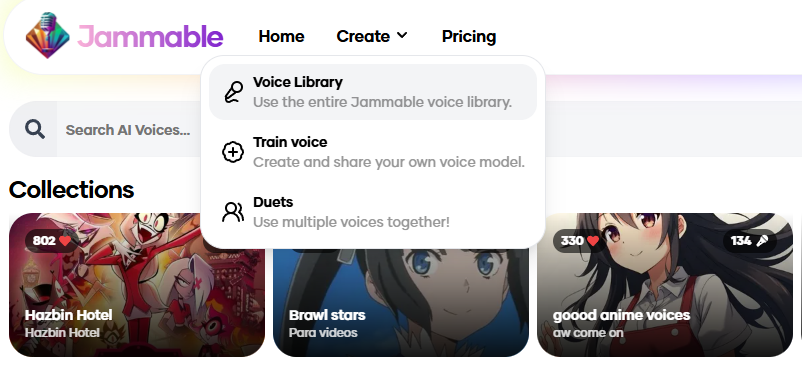
Once you log in, you will see thousands of models uploaded by the community. You can find everything from cartoons to politicians.
- Action: Click Create, then go to Voice Library. You will see a massive list of AI models to choose from.
2. Create Music
- After selecting a model, click “Create”.
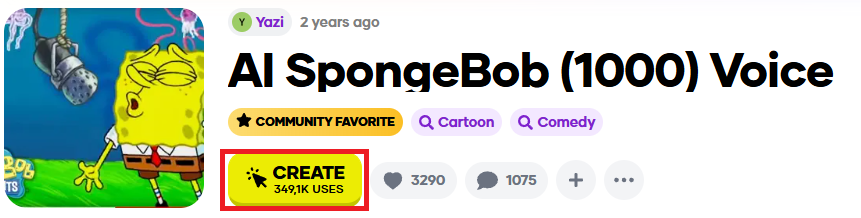
- Next, a selection menu will appear. Click on “Audio to Sing”.
- You will then have 4 input options to choose from:
- Upload Song: Upload an audio file, and Spongebob will sing it.
- Record: Record your own voice, and Spongebob will mimic your performance.
- Text to Speech: Type in your lyrics, and Spongebob will sing them.
For this tutorial, we will choose the “Upload Song” option.
- Next, upload your song and click “Start Cover”.
4. The Result
After about 30-60 seconds, you get your track.
Is it worth it?
- The Cost: It’s not free. You pay for credits.
- The Quality: It’s fun and viral, but it’s not “studio quality” like ElevenLabs. It often sounds a bit fuzzy or robotic, which is fine for memes but not for professional production.
For viral content, Jammable acts as the best text to speech for songs generator because of its huge library.
Method 2: The “Composer” Method (Text-to-Song)
What if you don’t want to sing, and you don’t want a cover of an existing song? You just want a brand new, unique track for your video background.
Previously, you had to use separate AI music tools. Now, ElevenLabs has integrated this capability directly into their platform.
It allows you to generate sound effects and short musical tracks just by typing a prompt.
How It Works (The “Magic” Box)
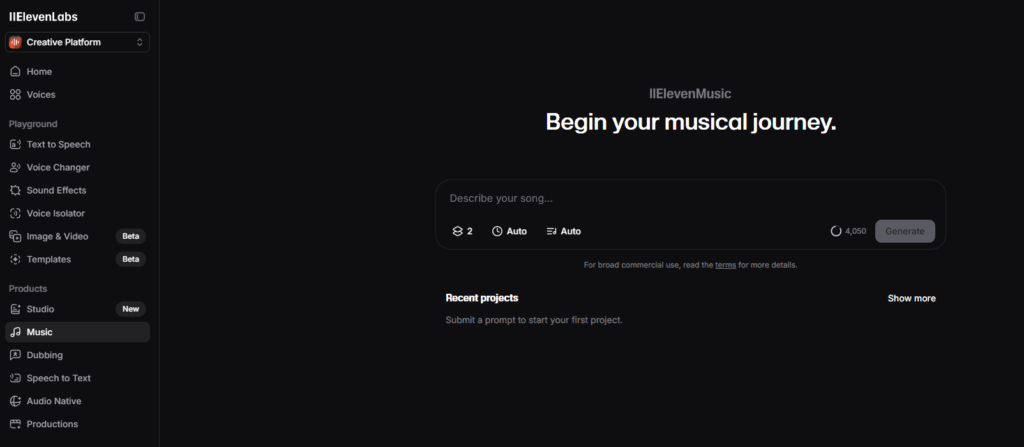
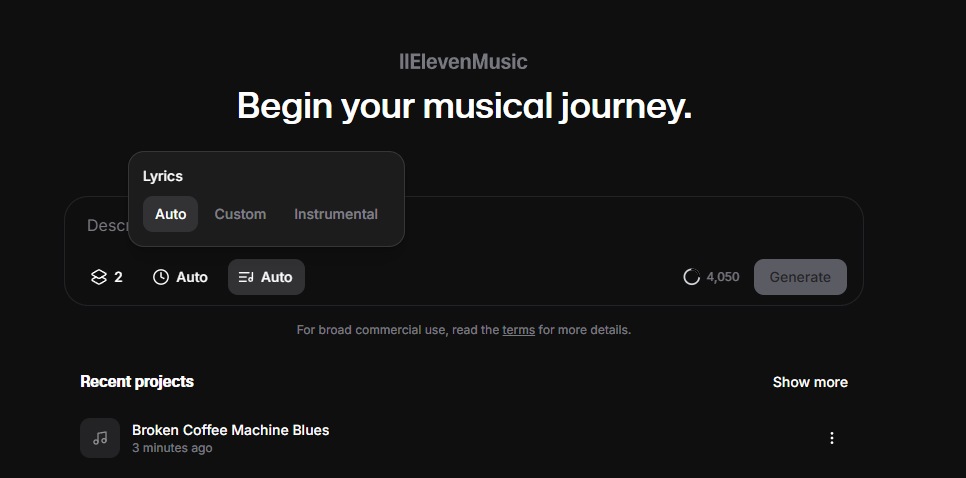
- Go to the “Music” tab in the ElevenLabs dashboard.
- Type a description of the sound or music you want.
- Click Generate.
My Test: The “Sad Coffee” Song
I wanted to test if it could handle something specific and emotional. My Prompt: “A sad, acoustic guitar melody about a broken coffee machine.” You can select the song duration, write your own lyrics for the AI to sing, and choose the number of variations ElevenLabs generates.
My Verdict: It’s a Full-Stack Music Studio
I was surprised by the flexibility. ElevenLabs isn’t just generating random sounds anymore.
- Instrumental Mode: You can switch to “Instrumental” to generate pure background music, beats, or soundscapes for your videos.
- Lyrics Mode: You can actually paste your own lyrics, and the AI will sing them in the style you requested.
Best for: Everything from custom intro songs (with your channel name in the lyrics) to mood-setting background ambience.
The Benefit: It is royalty-free. You don’t have to worry about YouTube copyright strikes or paying for Epidemic Sound. Since this feature is included in the standard ElevenLabs subscription, you get a voice generator and a music studio for one price.
This royalty-free music generator is a game-changer if you are building a Faceless YouTube Channel and want to avoid copyright strikes.
Method 3: The “Singer” Method (Speech-to-Speech)
This is the hidden gem of AI audio, but you need to understand how it works.
The Solution: Use ElevenLabs Speech-to-Speech.
Think of it as a Pro Voice Changer, not “Auto-Tune”. It replaces the timbre of your voice (so you sound like Adam or Rachel), but it keeps your exact rhythm, pitch, and melody.
⚠️ The Reality Check (My Failed Experiment)
I thought this tool would turn my terrible shower singing into a Grammy-winning performance. I was wrong.
Since ElevenLabs mimics your input perfectly:
- If you sing off-key -> The AI sings off-key.
- If you have great flow -> The AI has great flow.
Listen to my test:
1. My Original Input (Me trying to sing):
2. The Result (ElevenLabs):
My Verdict: It sounds much worse and the notes are still wrong. Pro Tip: This feature is PERFECT for Rap, Spoken Word, or Rhythmic Intros where melody is less important than flow. For singing, you need to be able to hold a tune first.
How to Do It (Step-by-Step)
- Log in to ElevenLabs.
- Go to Voice Changer.
- Upload or record your audio file (MP3/WAV).
- Choose a voice (e.g., Adam for deep vocals, Rachel for pop vocals).
- Click Generate.
This is the only way to get AI to “sing” exactly the way you want it to without using complex music software.
If you want to keep your rhythm, this is currently the best text to speech for songs method available.
Speech-to-Speech changes the rhythm, but if you just want to clone your voice for speaking (not singing), check out my full ElevenLabs Voice Cloning Review.
FAQ: Copyright & Monetization
Q: Can I monetize AI Covers (e.g., Spongebob singing a pop song)? A: It is very risky. Using a copyrighted character or a famous artist’s voice to cover a copyrighted song is a legal minefield. Record labels (like UMG or Sony) are aggressively issuing copyright strikes against these videos.
- My Advice: Do not build a business on AI Covers of famous songs. Use Method 1 (Speech-to-Speech with your own content) or Method 3 (ElevenLabs Music) to create original, royalty-free content that you can safely monetize on YouTube.
Q: Can ElevenLabs voices sing? A: It depends on the tool you use.
- Standard TTS: No. If you paste lyrics into the standard “Adam” voice, he will just read them.
- Speech-to-Speech: Yes. If you sing or hum into the microphone, the AI will copy your melody and rhythm perfectly using a different voice.
- Music Generator: Yes. The new “Music” tab allows you to write lyrics, and the AI generates a full song with vocals from scratch.
Q: What is the best text to speech for songs on mobile? A: Jammable works great on mobile browsers for covers.
Conclusion: What is the Best Text to Speech for Songs?
Creating music with AI is no longer sci-fi, but you must pick the right tool for your goal.
- For Viral Memes & Covers: If you want Spongebob or Drake to sing a hit song, use Jammable. It’s fun, fast, but risky for monetization.
- For Rhythmic Intros & Voiceovers: If you want a voice that flows like a rapper or a movie trailer but you hate your own voice, use ElevenLabs Speech-to-Speech. It fixes your tone but keeps your rhythm.
- For Background Music: If you need unique, royalty-free music for your YouTube videos, use the new ElevenLabs Music generator.
My Personal Pick? I stick with ElevenLabs. Why? Because it is the safest bet. You get the voice changing (Speech-to-Speech) AND the music generation in one subscription, and you own the commercial rights. It’s a full audio studio for $5.
Transparency Note: This post contains affiliate links. If you use these links to buy something, I may earn a commission at no extra cost to you. Thanks for your support!