In 2026, we are no longer asking, “Does this AI sound like a human?” We passed that milestone years ago.
Today, the only question that matters is: “Which AI sounds the best?”
The market is currently flooded with hundreds of “revolutionary” voice tools. But let’s be honest: 90% of them are just expensive wrappers for outdated technology, producing robotic, flat audio that scares away audiences. Finding a tool that captures the subtle breath, emotion, and pacing of a real voice actor is becoming harder, not easier.
I have done the heavy lifting so you don’t have to.
I didn’t just read the marketing brochures. Over the last year, I have tested dozens of platforms, generated countless hours of audio, and—most importantly—used these tools to run profitable Faceless YouTube channels and produce professional voiceovers.
This is not a random list of every tool on the internet. This is a curated list of the top 7 platforms that are actually good enough to use in professional production. These are the tools that pay for themselves.
2. How I Ranked These Tools (My Methodology) 🧪
There is a big difference between a tool that sounds good in a 5-second demo and a tool you can actually use to produce a 10-minute video.
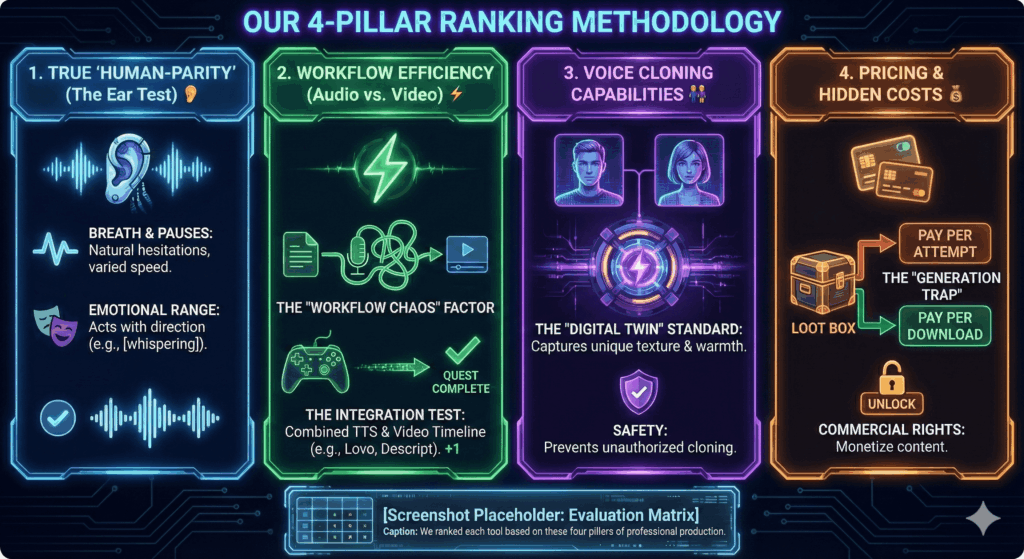
To ensure this list is actually useful, I stress-tested every platform on this list using four critical criteria. Here is exactly what I looked for:
1. True “Human-Parity” (The Ear Test) 👂
This is the baseline. Does the AI sound like a person, or does it sound like a robot trying to sound like a person?
Breath & Pauses: Real humans pause to breathe. They hesitate. They vary their speed. I looked for models that include these micro-imperfections automatically.
Emotional Range: Can the voice actually “act”? I tested how well these tools handle specific directions like [whispering] or [shouting] without breaking into static noise.+1
2. Workflow Efficiency (Audio vs. Video) ⚡
This is often overlooked. Great audio is useless if it takes you 5 hours to sync it with your video.
The “Workflow Chaos” Factor: Most creators hate switching between ChatGPT for scripts, a voice generator for audio, and Premiere Pro for editing.+1
The Integration Test: I gave extra points to tools like Lovo and Descript that combine text-to-speech with a video timeline, saving massive amounts of editing time.+1
3. Voice Cloning Capabilities 👯
Many tools claim to clone your voice, but few do it well.
The “Digital Twin” Standard: I tested whether the cloned voice captured the unique texture and warmth of the original recording, or if it just sounded like a metallic, generic version of me.
Safety: I also checked if the platform provides security measures to prevent unauthorized cloning.
4. Pricing & Hidden Costs 💰
A cheap subscription isn’t always cheap.
The “Generation Trap”: I analyzed whether the platform charges you for every attempt (generation) or only for the final download. This is crucial because re-generating a sentence to get the right emotion can burn through your credits in minutes.+1
Commercial Rights: I verified which plans actually allow you to monetize your content on YouTube.
We ranked each tool based on these four pillars of professional production.
3. Ranking The TOP 4 (The Big Four) 🏅
We start with the heavy hitters. These are the platforms that currently define the industry standard.
If you have spent any time in the AI space, this ranking shouldn’t surprise you. ElevenLabs remains the undisputed heavyweight champion of AI audio.
While other tools try to be “marketing suites,” ElevenLabs has focused 100% of its R&D on one thing: Creating the most realistic synthetic human voice possible. And in 2026, they are still miles ahead of the pack.
Best For:
Authors: For creating audiobooks that sound narrated by professionals.
Video Creators (Dubbing): For translating existing videos into 29 languages using the AI Dubbing Studio.
High-End Creators: Who care about audio texture and emotional nuance above all else.
Why It Is The Winner: The “Soul” in the Machine 🧠
Most AI voices can read text. ElevenLabs voices can act. The key differentiator is the Contextual Awareness. If you type a sentence with a hesitation, a sigh, or a change in tone, the AI understands the context and adjusts the delivery. It doesn’t just pronounce words; it interprets the meaning behind them.
The “Real World” Test: Turbo v2.5 & Cloning 🧪
I put their latest model (Turbo v2.5) to the test to see if it lives up to the hype (check out our guide on how to use elevenlabs to master these settings yourself).
Speed: The latency is practically non-existent. It generates long paragraphs almost instantly, which is a game-changer for developers building real-time voice bots.
Voice Cloning: This is the feature that made them famous. I uploaded a 1-minute sample of my own voice.
The Result: The clone was frighteningly accurate. It didn’t just capture my pitch; it captured my cadence and the way I trail off at the end of sentences.
Listen to the micro-pauses and breath intakes. This is what we call “Human-Parity.
The Video Capability: AI Dubbing Studio 🎥
Here is where ElevenLabs has evolved. It is no longer just for audio files. With the AI Dubbing Studio, you can upload a finished video file, and the AI will:
Transcribe it.
Translate it into another language (e.g., English to Spanish).
Generate a new voiceover that matches the original speaker’s voice.
Sync the new audio to the video automatically.
The Limitation: Dubbing vs. Editing 📉
While ElevenLabs handles video files, it is important to understand the distinction:
ElevenLabs is for Dubbing: Great if you already have a video and want to change the voice or language.
Lovo is for Creation: Great if you have nothing and need to build a video from scratch using stock footage. ElevenLabs does not have a timeline editor, stock library, or B-roll integration. If you need to build a video from zero, you will still need external software.
Final Verdict ⚖️
If your goal is to translate or voice-over existing video content with the highest possible quality—ElevenLabs is the only choice. However, if you need a tool to build the video visually (add images, text, transitions), you will need to pair ElevenLabs with an editor (or use Lovo).
#2. Lovo AI / Genny (Best for YouTubers & Video Creators) 🎬
If ElevenLabs is a recording studio, Lovo AI (specifically their platform “Genny”) is a video production house. You can read our full, in-depth lovo ai review here for a complete breakdown of features.
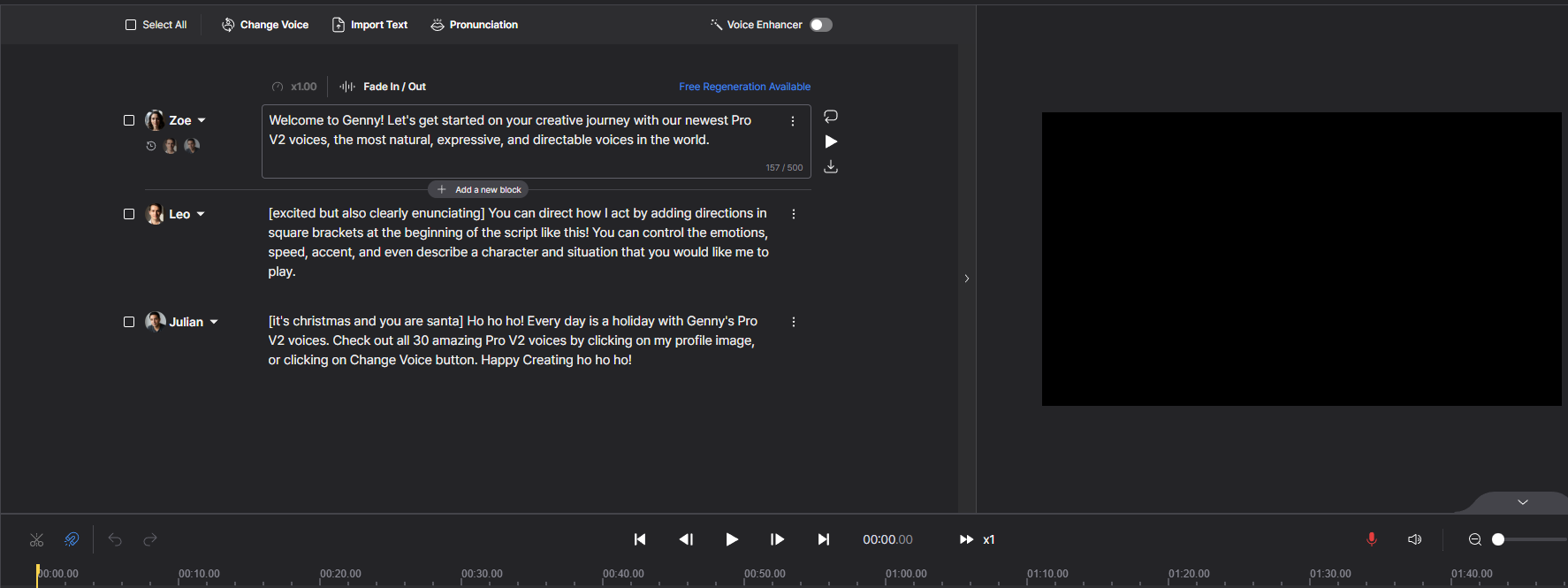
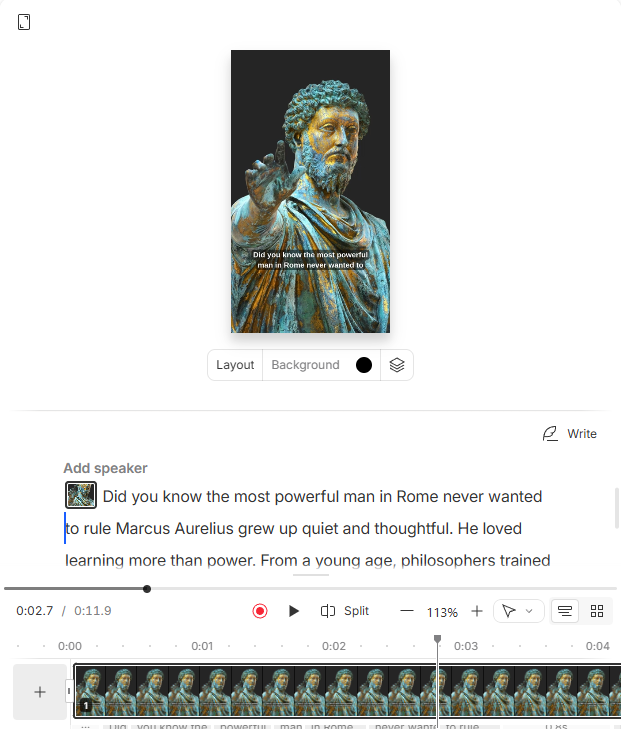
While most tools on this list require you to download an audio file and switch to a separate editor like Premiere Pro or CapCut, Lovo allows you to do everything in one browser tab. It is currently the only tool that successfully combines high-quality AI voices with a full timeline-based video editor.+1
Best For:
Faceless YouTube Channels: Perfect for “Cash Cow” channels (Top 10 lists, History, True Crime) where speed is everything.
Marketers: For creating explainer videos and ads without hiring a team.
L&D/E-Learning: For turning text policies into training videos quickly.
Why It Ranked #2: The “All-in-One” Workflow ⚡
The biggest strength of Lovo is the Video Timeline. Instead of a simple text box, you get a multi-track interface where you can:
Generate the Script: Use the built-in AI Writer to draft your content.
Generate the Voice: Select from 500+ voices.
Add Visuals: Add stock footage directly from Pixabay and Unsplash, which are integrated right into the sidebar.
You can sync the voiceover with the video clips instantly, cutting production time by up to 70%.
The “Director Mode”: Controlling the Performance 🎭
Lovo offers a feature called AI Voice Direction. Instead of just selecting a “Sad” preset from a dropdown menu, you can direct the AI like a real actor using text prompts within square brackets.
How it works: You type [whispering with fear] or [excited] at the start of the sentence.+1
The Result: The AI adjusts its pacing, breathiness, and pitch dynamically. The “Sad” and “Whispering” prompts are particularly convincing in the Pro voices.+1
The Downsides: Cloning & Credits ⚠️
To be transparent, there are two areas where Lovo falls short of ElevenLabs:
Voice Cloning Quality: While the stock “Pro” voices are fantastic, the custom voice cloning feature feels a generation behind. It often sounds slightly metallic or “tinny” compared to the original recording.+1
The Credit System: Lovo deducts credits based on generation, not video export. If you re-generate a sentence 5 times to get the acting right, you pay for all 5 attempts.+1
Final Verdict ⚖️
If you want the absolute best audio quality and don’t mind editing video elsewhere, stick with ElevenLabs. But if you want to automate your video production and stop juggling three different subscriptions, Lovo AI is the most efficient tool on the market.
#3. Murf AI (Best for Corporate & Presentations) 👔
If Lovo is the “Creative Director,” Murf AI is the “Corporate Executive.”
While it might lack the wild, emotional acting range of ElevenLabs or the stock footage chaos of Lovo, it makes up for it with extreme precision and professionalism. It is designed for environments where clarity is more important than drama: boardrooms, employee onboarding, and product demos.
Best For:
HR & L&D Teams: For creating consistent internal training videos (e.g., Safety Briefings, Compliance).
Corporate Trainers: For converting boring PDF manuals into audio lessons.
Sales Professionals: For adding professional voiceovers to slide decks.
Why It Ranked #3: The “Slide-Sync” Workflow 📊
Murf’s superpower is its interface, which feels less like a video editor and more like PowerPoint on steroids.
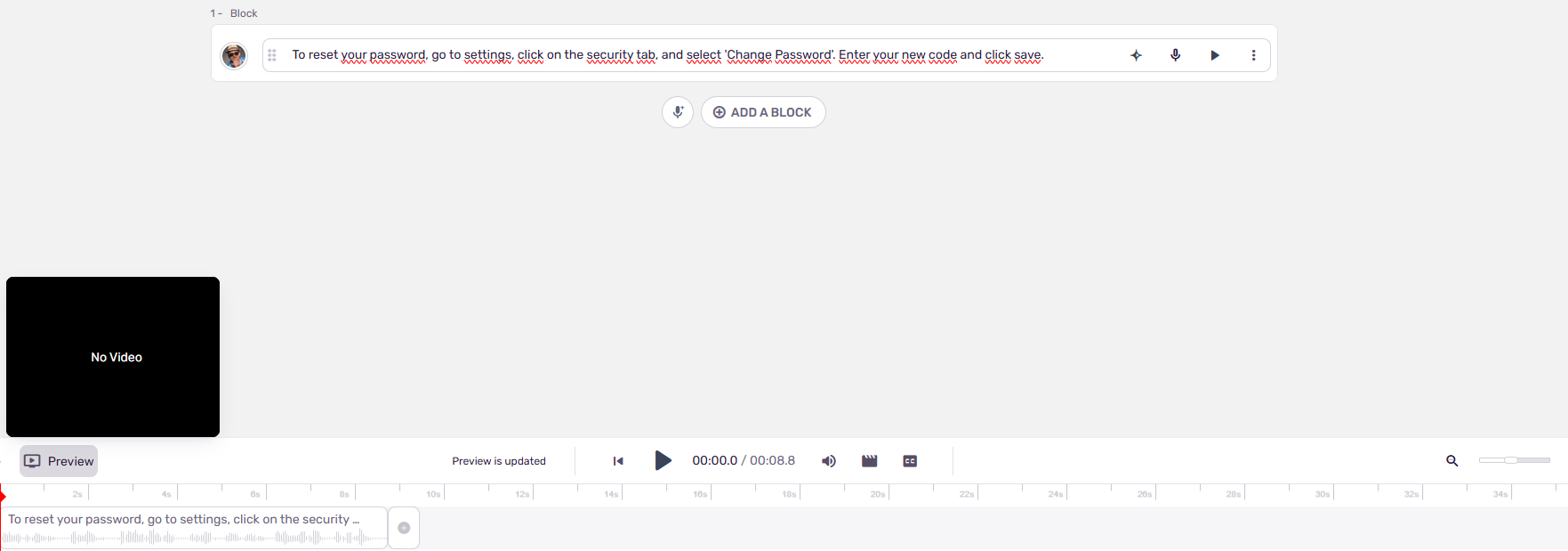
You can upload your slides (or images), and Murf creates a block of text for each visual. This makes it incredibly easy to sync specific talking points to specific slides without messing around with a complex timeline.
The “Clean” Sound: Murf’s voices are engineered to be crisp, articulate, and trustworthy. They don’t mumble or whisper; they deliver information with authority.
Murf’s interface is designed for presentations. You match text blocks directly to your slides.
Murf AI vs. Lovo AI: The “Vibe” Check 🆚
I often get asked to compare these two because they both offer video features (see our detailed murf ai review for more pros and cons). Here is the simple breakdown:
Lovo (Genny) feels “Creative.” It is packed with Generative AI tools like an Art Generator and Script Writer. It’s built for engagement and entertainment.
Murf AI feels “Corporate.” It strips away the distractions. It doesn’t have an AI Art generator because HR directors don’t need Cyberpunk cats in their safety videos.+1
The Downsides: Less “Creation” Power 📉
The strict focus on business is also its limitation.
No Generative Extras: Unlike Lovo, Murf does not help you write the script or generate visuals from scratch. You need to bring your own assets.
Rigid Acting: While the voices are professional, they struggle with high-drama storytelling (like horror or comedy) compared to ElevenLabs.
Final Verdict ⚖️
If you are looking for a tool to spice up your YouTube channel, go with Lovo. But if you need a safe, reliable, and professional tool for your company—one that won’t accidentally make your CEO sound like an anime character—Murf AI is the safest bet for the office.
While ElevenLabs and Lovo are designed to replace the human voice, Descript is designed to fix it.
It is technically a full audio/video editing suite, but its AI voice capabilities are so revolutionary that it deserves a top spot on this list. If you are a podcaster or a “talking head” YouTuber, this tool will save your life.
Best For:
Podcasters: Who need to edit hour-long interviews quickly.
Vloggers: Who record their own voiceovers but hate re-recording takes.
Content Teams: Who need to repurpose webinars into clips.
The Magic: Edit Audio by Editing Text 🪄
Descript changed the game with one simple concept: It transcribes your audio, and then lets you edit the text to edit the sound. If this sounds like magic, check out our descript review to see it in action.
If you recorded a 30-minute podcast and realized you said “um,” “uh,” or stuttered 50 times, you don’t need to hunt for those waveforms. You simply search for “um” in the text transcript and hit Delete. Descript automatically cuts those sections out of the audio seamlessly.
Don’t edit waveforms. Edit text. When you delete a word from the script, Descript removes it from the audio.
The AI Feature: “Overdub” (Fix Mistakes Without Re-recording) 🧬
This is the “AI Voice Generator” feature that lands Descript on this list. Imagine you recorded a perfect 10-minute take, but you realized you said “2024” instead of “2026.” In the past, you would have to set up your mic, match the room tone, and re-record the whole sentence.
With Descript’s Overdub:
You create a clone of your own voice (using their AI).
You highlight the wrong word (“2024”) in the transcript.
You type the new word (“2026”).
Descript generates the new audio in your voice and stitches it into the recording invisibly.
Can you spot the fake? The word “special” was typed, not spoken. The AI mimics the speaker’s tone perfectly to blend it in.
The Core Difference 📉
It is important to understand what Descript is not.
It is not great for generating a 10-minute audiobook from scratch using a stock voice (use ElevenLabs for that).
It is an editor first and a generator second. It is meant to augment your performance, not create one from nothing.
Final Verdict ⚖️
If you are strictly looking for a Text-to-Speech tool to read a script, look elsewhere. But if you are a creator who records your own voice and wants to fix mistakes as easily as editing a Word document, Descript is the only tool that can do this.
The “Big Four” above are general-purpose production tools. However, depending on your specific needs, you might need something more specialized. Here are three niche tools that dominate their specific corners of the market in 2026.
#5. Speechify (Best for Consumption & Listening) 🎧
Best For: Students, Commuters, and people with Dyslexia/ADHD.
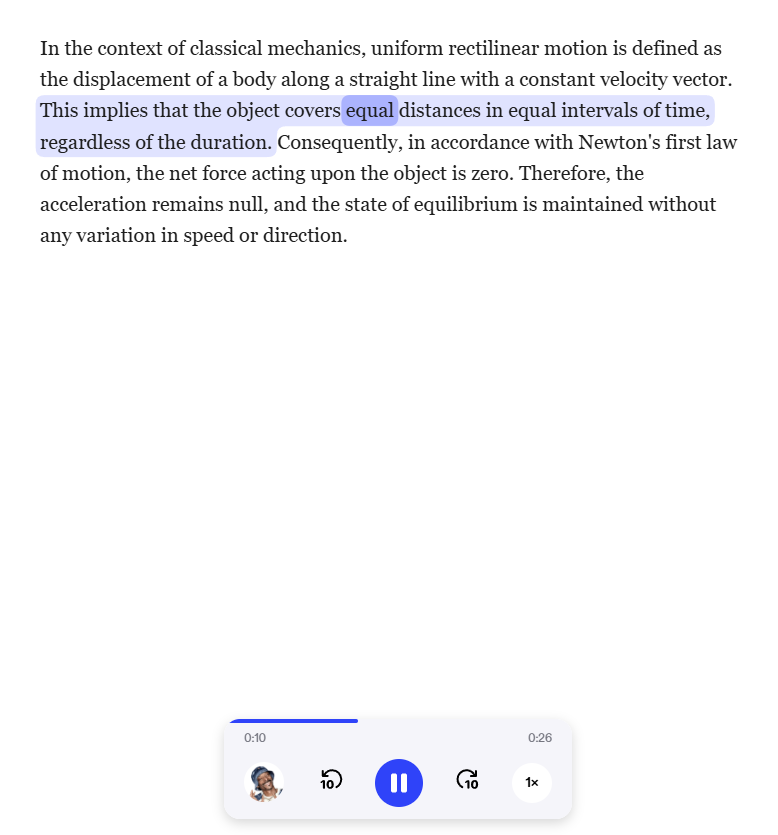
While Lovo and ElevenLabs are for creating content, Speechify is built for consuming it. It is the #1 text-to-speech app that reads websites, PDFs, and emails to you.
The “Cool” Factor: They have licensed official voices from celebrities like Snoop Dogg and Gwyneth Paltrow. Listening to a boring history textbook read by Snoop is a surprisingly effective way to study.
Production? They do have a “Studio” for creators, but their core strength remains their mobile app and Chrome extension that turns the internet into a podcast.
#6. Synthesia / HeyGen (Best for AI Avatars) 👱♀️
Best For: Sales Outreach, Corporate Training, and Localization.
Sometimes, a voice isn’t enough—you need a face. If you need a “Talking Head” video but don’t want to film yourself, Synthesia and HeyGen are the market leaders.
How it works: You type text, choose an avatar (or upload a photo of yourself), and the AI generates a video where the avatar speaks your script with perfect lip-syncing.
Video Translation: HeyGen is particularly famous for its ability to translate a video of you speaking English into Spanish, while changing your lip movements to match the Spanish words. It feels like magic.
#7. Jammable (formerly Voicify.ai) (Best for AI Music Covers) 🎵
Best For: Musicians, Meme Creators, and TikTok Trends.
This is the tool responsible for all those viral videos of “Kanye West” singing Taylor Swift songs or “Freddie Mercury” singing Ed Sheeran. Jammable focuses on RVC (Retrieval-based Voice Conversion) technology specifically tuned for singing.
The Difference: Standard TTS tools (like ElevenLabs) speak. Jammable models are trained to sing, holding notes and maintaining melody.
Warning: This is strictly for entertainment and parody. Copyright laws around AI music covers are still evolving in 2026, so be careful before uploading these to Spotify.
Jammable is designed for musical parody and viral trends, not professional narration.
6. Buying Guide: How to Choose the Right Tool? 🧭
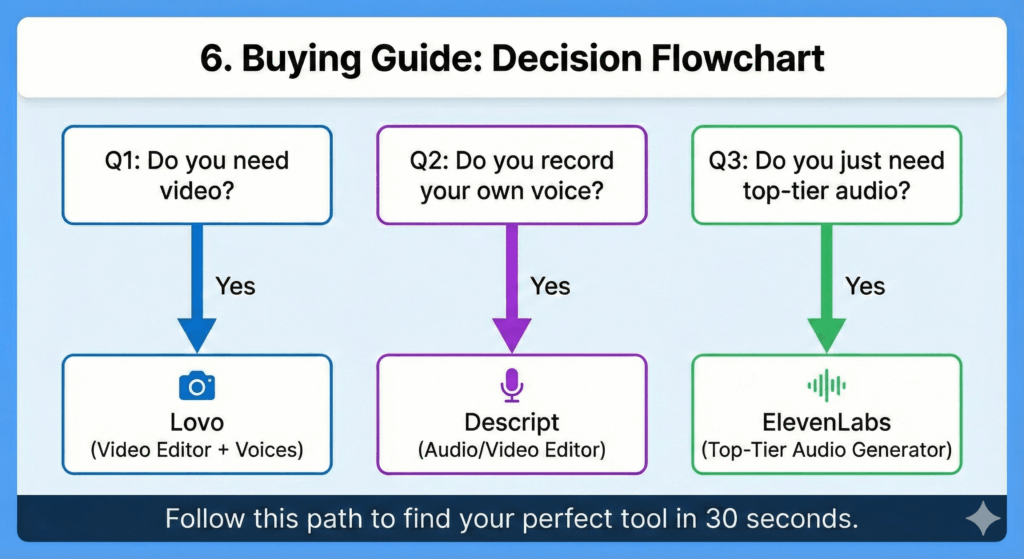
If you are still staring at the pricing pages and feeling overwhelmed, let’s simplify things. The truth is, there is no single “Best AI Voice Generator.” There is only the best tool for your specific workflow.
I have broken this down into the three most common scenarios I see in 2026. Find the one that matches you, and stop overthinking.
Scenario A: “I want to start a Faceless YouTube Channel.” 📺
You want to make “Top 10” lists, history explainers, or news updates. You don’t have a team, and you don’t want to show your face.
The Problem: You need more than just a voice. You need visuals, background music, and subtitles.
The Mistake: Buying ElevenLabs for audio, then paying for Storyblocks for footage, and then trying to learn Premiere Pro to stitch it together.
Why: It is the only tool that gives you the Voice, the Video Editor, and the Stock Footage (Pixabay/Unsplash) in one subscription. You will produce videos 5x faster here than anywhere else.
Scenario B: “I am writing an Audiobook or building an Indie Game.” 🎮
You are a storyteller. You need the audience to forget they are listening to a robot. You need sighs, gasps, whispers, and terrifying screams.
The Problem: Standard AI voices sound “flat” after 2 minutes. They kill the immersion.
Why: You aren’t generating a fake voice; you are fixing a real one. Descript’s “Filler Word Removal” is magic. Plus, if you mess up a sentence, you can use the Overdub feature to type the correction, and the AI will generate it in your voice to patch the recording.
7. Frequently Asked Questions (FAQ) 🙋♂️
Here are the honest answers to the most common questions I get asked about using AI voices in 2026.
Q: Which AI voice generator is the most realistic?
A: Without a doubt, ElevenLabs currently holds the crown for realism. While tools like Lovo and Murf are fantastic, ElevenLabs’ latest models (Turbo v2.5 and newer) excel at “Contextual Awareness.” They understand how a sentence should be read based on the punctuation and meaning. They naturally insert breath pauses, hesitations, and tonal shifts that make the audio indistinguishable from a human recording.
Q: Can I use AI voices for YouTube monetization?
A:Yes, absolutely. YouTube creates no policy against using AI voices, provided the content itself is valuable and not “spammy” or auto-generated nonsense. However, there is a legal catch:
You must possess the Commercial Rights to the audio.
Paid Plans: Platforms like Lovo AI and ElevenLabs grant you full commercial ownership of the audio you generate once you subscribe to their paid tiers (usually the “Starter” or “Basic” plans and up).
Free Plans: Most free plans DO NOT give you commercial rights. Using them on a monetized channel violates their Terms of Service and could lead to copyright claims.
Q: Is there a truly free AI voice generator?
A: Yes, but you need to be careful. Most “Free” tools fall into two categories:
The “Free Trial” Trap: Tools like Lovo or ElevenLabs let you generate audio for free, but you cannot download it or use it publicly without watermarks/attribution.
The “Robot” Tier: Totally free tools (like Google TTS or old text-to-speech sites) allow usage, but the quality is extremely robotic and will hurt your audience retention.
My Advice: If you are serious about content creation, the $15–$20/month for a starter plan is a necessary business expense to ensure you own your content legally.
8. Conclusion: Which Tool Should You Pick? 🏁
If you take one thing away from this guide, let it be this: There is no single “Magic Button” tool that does everything perfectly.
The “Best” AI voice generator depends entirely on what you are trying to build.
If you need unrivaled realism for an audiobook or high-end project, ElevenLabs is still the king.+1
If you want to produce YouTube videos fast without learning Premiere Pro, Lovo AI (Genny) is the only workflow that makes sense.+1
If you need corporate consistency for training slides, Murf AI is your safest bet.+1
If you need to fix your own voice recording, Descript is a lifesaver.
⚡ Actionable Tip: The “5-Minute Test”
Don’t just take my word for it. Audio is subjective, and workflow is personal. Most of these tools offer free trials or free tiers. I challenge you to do this right now:
Open ElevenLabs, type a complex sentence with emotion, and listen to the result.
Open Lovo (Genny), drag a stock video onto the timeline, and generate a voiceover.
You will see—and hear—the difference in less than 5 minutes. You will immediately know whether you prefer the pure quality of ElevenLabs or the video superpowers of Lovo.
🚀 Ready to Start?
Here are the direct links to the top 4 tools we reviewed:
Transparency Note: This post contains affiliate links. If you use these links to buy something, I may earn a commission at no extra cost to you. Thanks for your support!